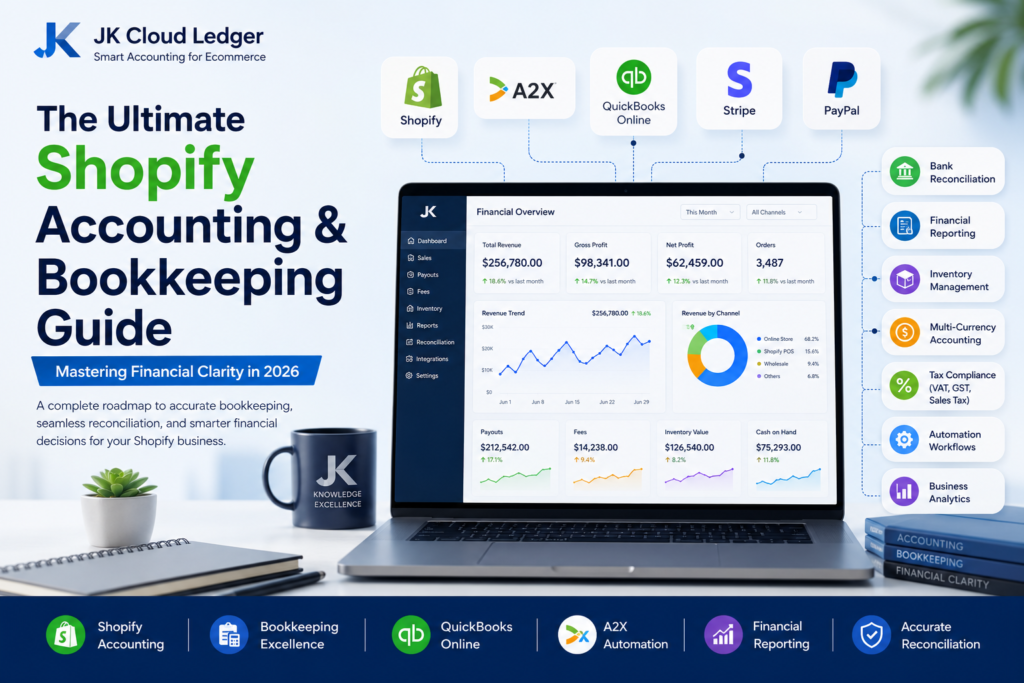
The Ultimate Shopify Accounting & Bookkeeping Guide: Mastering Financial Clarity in 2026
(Why growing Shopify stores can generate record-breaking sales while still struggling to understand their true financial position.)
Imagine your Shopify store generates $50,000 in monthly sales. Your Shopify dashboard proudly displays strong revenue growth, yet your bank account receives only $42,350. Stripe transfers arrive separately, PayPal retains reserves, merchant processing fees reduce payouts, refunds appear days later, and QuickBooks Online suddenly reports dozens of unreconciled transactions. At that moment, one question becomes unavoidable: Which number actually represents your business revenue?For many ecommerce businesses, this is where Shopify bookkeeping becomes far more complex than simply recording sales. Every order passes through multiple financial stages before reaching your bank account, including payment processing, gateway fees, shipping charges, refunds, chargebacks, taxes, currency conversions, and payout adjustments. Without a structured accounting workflow, profitable stores can unknowingly create reporting errors, inaccurate financial statements, cash flow blind spots, and unexpected tax liabilities. According to Shopify’s official documentation, payouts represent net deposits rather than gross sales, making accurate payout reconciliation essential for reliable financial reporting.[1]

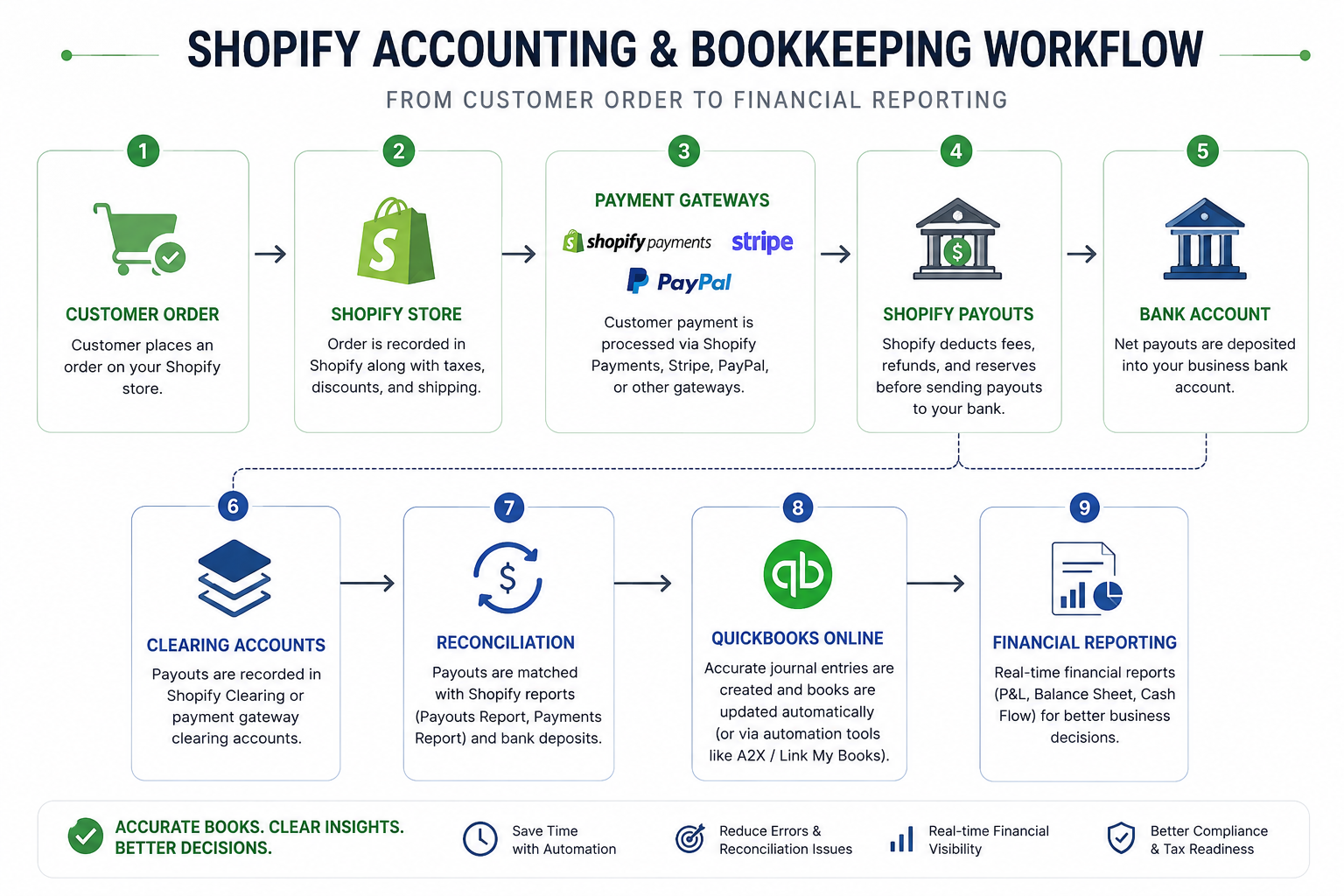
A typical Shopify transaction moves through multiple financial systems before reaching your bank account, making accurate bookkeeping and payout reconciliation essential for reliable financial reporting.
Professional Shopify accounting is not simply about balancing your books at month-end. It provides complete financial visibility into every stage of the ecommerce sales cycle—from the moment a customer places an order until every payment, processing fee, tax obligation, inventory movement, and bank deposit has been fully reconciled. Accurate bookkeeping enables business owners to monitor profitability, manage cash flow, prepare audit-ready financial records, comply with Generally Accepted Accounting Principles (GAAP), and make confident growth decisions based on reliable financial data rather than assumptions.[2]Whether you operate a growing Shopify store, manage multiple brands, or sell across Shopify, Amazon, Etsy, Stripe, PayPal, and additional ecommerce channels, maintaining accurate accounting records becomes increasingly complex as transaction volumes increase. Manual spreadsheets and basic bookkeeping methods often struggle to keep pace with thousands of monthly transactions, multiple payment gateways, inventory movements, and marketplace fees. Modern ecommerce businesses increasingly rely on cloud accounting platforms such as QuickBooks Online, combined with automation solutions like A2X and Link My Books, to simplify reconciliation while improving financial accuracy.This guide explains how professional Shopify bookkeeping actually works behind the scenes. You’ll learn how the Shopify order lifecycle impacts your accounting records, how payouts differ from revenue, how to reconcile every transaction accurately, how inventory and Cost of Goods Sold (COGS) affect profitability, and how automation can eliminate hours of manual bookkeeping each month. By the end of this guide, you’ll understand the financial systems used by successful ecommerce businesses to maintain audit-ready books, improve reporting accuracy, and build a stronger financial foundation for long-term growth.
Key Takeaways
- Shopify payouts rarely equal actual sales revenue because they include processing fees, refunds, taxes, and other financial adjustments.
- Accurate Shopify bookkeeping requires reconciling customer orders, payment gateways, bank deposits, inventory, and accounting software together.
- QuickBooks Online, A2X, and Link My Books significantly reduce manual reconciliation while improving financial accuracy.
- Understanding the complete Shopify accounting workflow helps prevent reporting errors, cash flow issues, and tax compliance problems.
- Professional bookkeeping transforms financial data into actionable business insights that support profitable ecommerce growth.
Understanding the Shopify Financial Flow
(How every Shopify order travels through multiple financial systems before becoming revenue in your accounting records.)
One of the biggest misconceptions among Shopify merchants is believing that the amount shown on the Shopify dashboard is the same amount that should appear in their accounting software. In reality, every customer order follows a much more complex financial journey before it reaches your Profit & Loss statement and Balance Sheet.A single purchase may pass through Shopify Payments, Stripe, PayPal, Shop Pay, or another payment gateway before funds are grouped into payouts. Along the way, payment processing fees, shipping income, sales tax, discounts, refunds, chargebacks, currency conversions, and payout adjustments are applied. By the time money reaches your bank account, the deposited amount rarely matches the original customer order. This is why professional ecommerce bookkeeping focuses on the complete financial lifecycle rather than simply recording bank deposits.[1]Understanding this flow is essential for accurate Shopify accounting. Every financial event must be recorded in the correct accounting period and allocated to the appropriate accounts to ensure reliable financial statements, accurate tax reporting, and meaningful business insights. When businesses understand how money moves through their ecommerce ecosystem, reconciliation becomes significantly easier, reporting becomes more accurate, and decision-making becomes far more reliable.
Every Shopify order passes through multiple financial systems before appearing in your accounting records, making accurate reconciliation essential for reliable financial reporting.
Expert Insight: Never record Shopify payouts as sales revenue. A payout is a bundled bank deposit that includes multiple financial components such as sales, processing fees, taxes, refunds, and adjustments. Proper bookkeeping separates each component before recording it in your accounting system.
The Shopify Order Lifecycle
(Every Shopify order passes through multiple accounting events before becoming recognized revenue.)
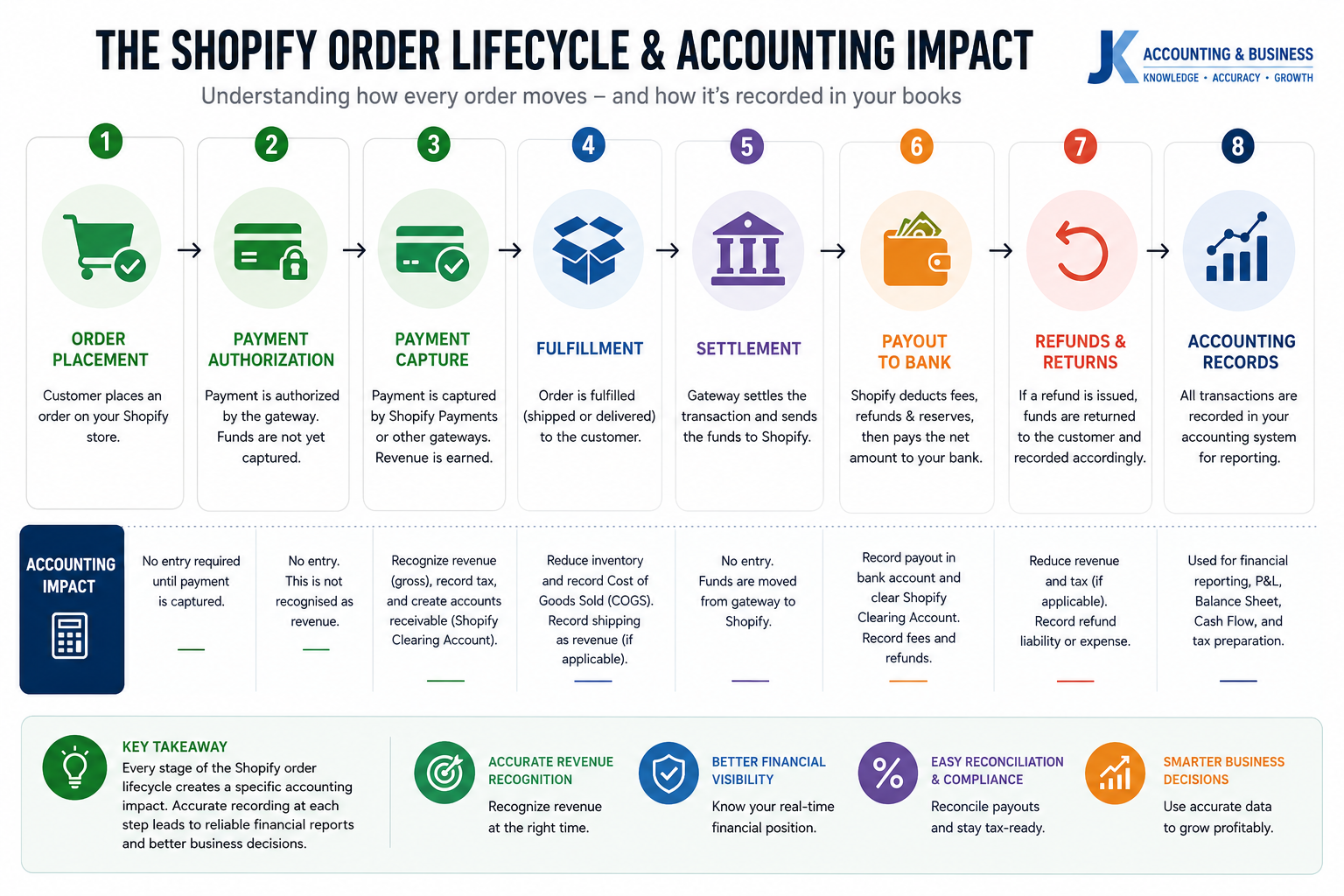
Many Shopify bookkeeping guides begin and end with recording a sale. While this approach may appear simple, it overlooks one of the most important principles of ecommerce accounting: an order is not a single financial event. Instead, every Shopify order progresses through a series of operational and financial stages, each carrying its own accounting implications.From the moment a customer places an order until the final payout reaches your bank account, Shopify continuously updates the order’s status. Payment authorization, payment capture, fulfillment, settlement, payouts, refunds, and inventory adjustments all affect different accounts within your accounting system. According to the Shopify Orders API, these state changes are fundamental to how orders are processed and tracked throughout the platform.[3]Understanding this lifecycle allows accountants and ecommerce business owners to recognize revenue correctly, reconcile payment gateways accurately, monitor inventory movements, and produce financial statements that comply with Generally Accepted Accounting Principles (GAAP). Rather than viewing a Shopify order as a single sale, professional bookkeeping treats it as a sequence of financial events that must each be recorded at the appropriate time.
| Stage | Business Event | Accounting Impact |
|---|
| Order Placed | Customer completes checkout. | No accounting entry yet unless payment is captured immediately. |
| Payment Authorized | Payment method is approved but funds are not yet collected. | Creates a pending payment obligation within the payment gateway. |
| Payment Captured | Funds are successfully collected. | Revenue is recognized under accrual accounting and Accounts Receivable (or Gateway Receivable) increases. |
| Order Fulfilled | Products are shipped to the customer. | Cost of Goods Sold (COGS) is recognized and inventory value decreases. |
| Settlement | Payment gateway prepares funds for payout. | Balance moves from Gateway Receivable into a clearing account. |
| Payout | Net funds arrive in your bank account. | Transfer from clearing account to bank while recording processing fees and adjustments. |
| Refund / Return | Customer receives a refund or returns merchandise. | Revenue decreases, inventory may increase, and liabilities or refund adjustments are recorded. |
Accounting Insight: Shopify payouts should never be treated as sales revenue. Revenue is generally recognized when payment is captured under accrual accounting, while payouts simply represent the transfer of already-recorded funds into your bank account after fees, refunds, taxes, and other adjustments have been applied.
Following the complete order lifecycle ensures that revenue, inventory, payment gateway balances, and cash movements remain synchronized across Shopify, QuickBooks Online, and your financial statements. This approach significantly reduces reconciliation errors and provides a far more accurate picture of business performance than recording bank deposits alone. It also aligns with accrual accounting principles, where revenue and related expenses are recognized in the period in which they occur rather than when cash is received.[7]
Shopify Fees Breakdown
(Understanding every Shopify fee helps you measure true profitability instead of simply tracking sales.)
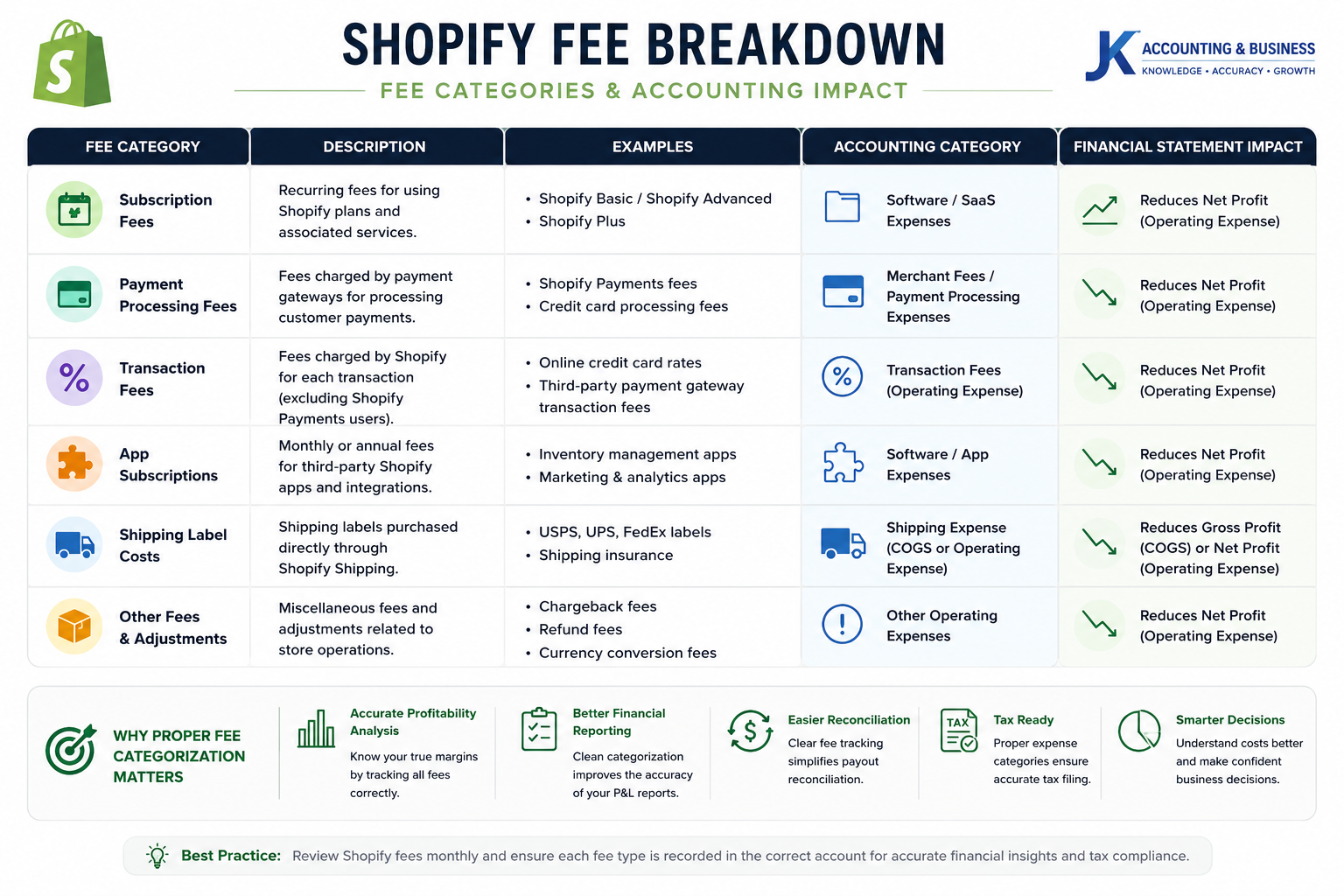
One of the most common bookkeeping mistakes among Shopify merchants is recording every deduction as a single “Shopify Fee.” In reality, Shopify charges several different types of fees, each serving a different business purpose and requiring separate accounting treatment. Incorrectly categorizing these expenses can distort your Gross Profit, inflate or understate your Operating Expenses, and ultimately produce misleading financial reports.Professional ecommerce accounting separates subscription costs, merchant processing fees, third-party transaction fees, shipping expenses, and software subscriptions into their appropriate chart of accounts. This provides a much clearer understanding of profitability while making month-end reconciliation significantly easier. Shopify’s official pricing documentation also distinguishes between subscription plans, payment processing fees, transaction fees, and additional services, reinforcing the importance of accurate expense classification.[8]
| Fee Type | Description | Recommended Accounting Category |
|---|
| Shopify Subscription | Monthly platform subscription based on your Shopify plan. | Operating Expense (Software / SaaS) |
| Third-Party Transaction Fee | Additional fee charged when using external payment gateways. | Merchant Fees / Payment Processing Expense |
| Payment Processing Fee | Credit card processing charges through Shopify Payments. | Merchant Fees / Payment Processing Expense |
| App Subscription Fees | Recurring charges for Shopify apps and integrations. | Software & Technology Expense |
| Shipping Label Costs | Shipping labels purchased through Shopify Shipping. | Shipping Expense or Cost of Goods Sold (COGS) |
Different Shopify fees impact different areas of your financial statements. Proper categorization improves reporting accuracy, profitability analysis, and month-end reconciliation.
Separating Shopify expenses into their correct accounting categories gives business owners far greater visibility into operating costs and gross margins. For example, payment processing fees directly reduce the profitability of each sale, while software subscriptions reflect ongoing operational investments. Likewise, shipping label expenses should be tracked separately to accurately evaluate fulfillment costs and overall order profitability.Maintaining this level of detail also simplifies tax preparation and financial analysis. Instead of reviewing one large “Shopify Expense” account, accountants can quickly identify where money is being spent and determine whether merchant fees, software costs, or shipping expenses are increasing over time. This visibility enables more informed pricing decisions, better cost control, and stronger financial planning as your ecommerce business grows.
Accounting Tip: Avoid recording all Shopify deductions under a single expense account. Breaking down subscription fees, payment processing charges, shipping costs, and software subscriptions provides more accurate Profit & Loss reports and helps identify opportunities to improve margins.
Shopify Payments vs Stripe vs PayPal: Which Payment Gateway Is Best for Ecommerce Accounting?
(The right payment gateway affects far more than checkout conversions—it influences reconciliation, cash flow, processing costs, and financial reporting.)
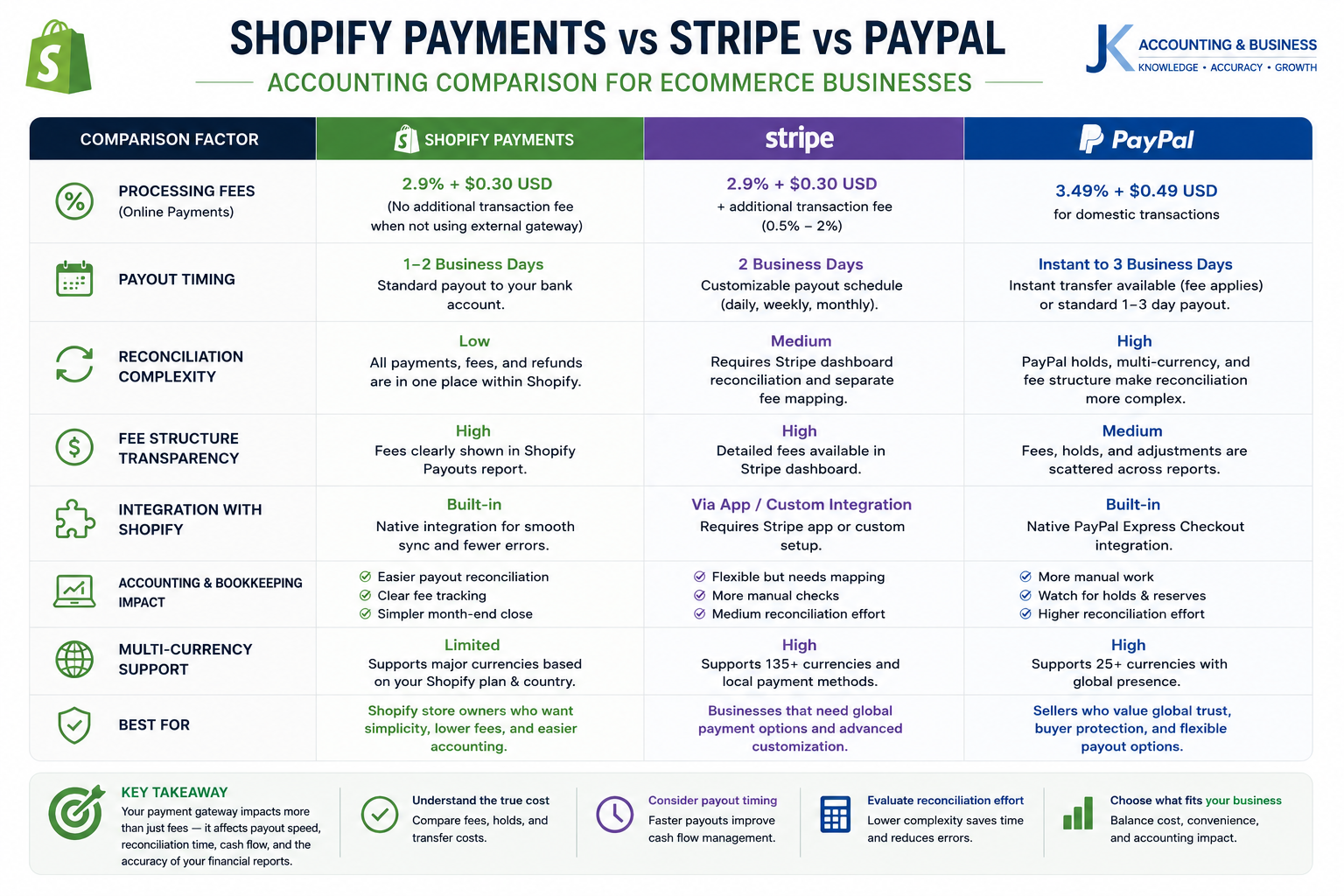
Choosing a payment gateway isn’t simply a marketing or customer experience decision. From an accounting perspective, every gateway follows a different settlement process, fee structure, payout schedule, and reconciliation workflow. These differences directly impact how transactions flow into QuickBooks Online and how easily accountants can reconcile deposits at month-end.For businesses processing hundreds or thousands of orders each month, selecting the right payment ecosystem can significantly reduce bookkeeping time while improving financial accuracy. Shopify Payments offers the most seamless experience within the Shopify ecosystem, whereas Stripe and PayPal often require additional reconciliation steps or third-party automation tools such as A2X or Link My Books.
| Feature | Shopify Payments | Stripe | PayPal |
|---|
| Platform Integration | Native integration with Shopify reports and payouts. | Requires connector or accounting integration. | Separate reporting and reconciliation workflow. |
| Typical Processing Fee | Approximately 2.4%–2.9% + $0.30* | Approximately 2.9% + $0.30* | Approximately 3.49% + fixed fee* |
| Payout Schedule | Usually 2–3 business days. | Typically 2–7 business days. | Instant to 1 business day (depending on account settings). |
| Reconciliation Complexity | Low (excellent with A2X automation). | Medium (requires Stripe settlement reconciliation). | High (fees, reserves, disputes, and separate balances). |
Different payment gateways have unique payout structures, fee models, and reconciliation workflows that directly impact ecommerce bookkeeping and financial reporting.
Although processing fees often receive the most attention, accountants typically focus on how each payment platform settles transactions. Shopify Payments groups orders into payout batches that are relatively straightforward to reconcile, while Stripe separates charges, refunds, disputes, and payouts into multiple reporting layers. PayPal introduces additional complexity through reserve balances, currency conversions, buyer protection adjustments, and independent account balances that frequently require separate reconciliation.For high-volume Shopify merchants, automation platforms such as A2X or Link My Books can significantly reduce manual bookkeeping by summarizing thousands of transactions into clean accounting entries that match actual bank deposits. This approach improves reconciliation accuracy while eliminating duplicate journal entries and reducing month-end close times.
Best Practice: Select a payment gateway based not only on transaction fees but also on reconciliation efficiency, reporting capabilities, payout consistency, and integration with your accounting software. Saving a few basis points on processing fees can quickly be offset by increased bookkeeping complexity.
Why Clearing Accounts Are Essential for Accurate Shopify Accounting
(The secret behind clean reconciliations, accurate monthly reporting, and audit-ready ecommerce books.)
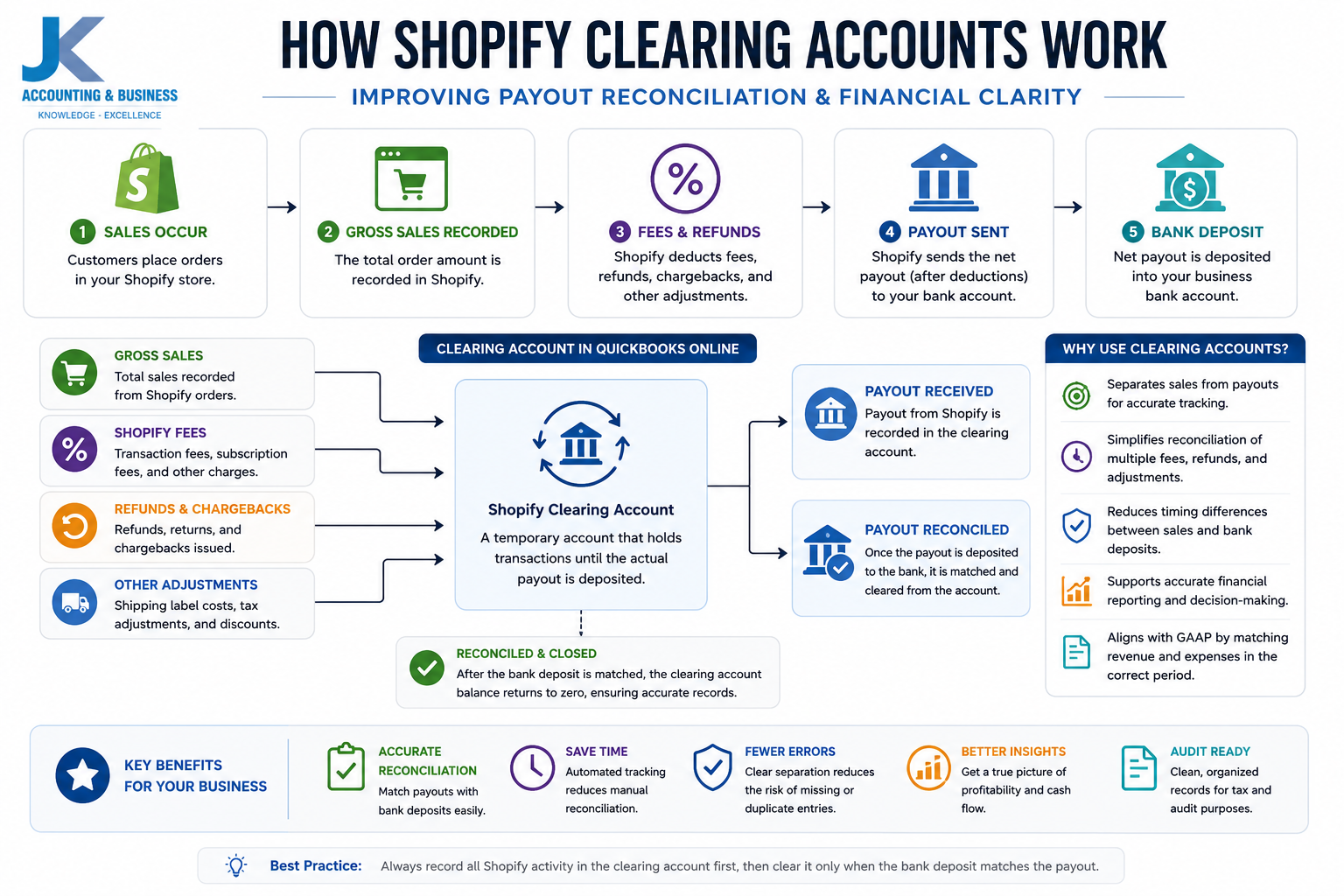
One of the most common bookkeeping mistakes made by Shopify merchants is recording every bank deposit as sales revenue. While this may appear correct at first glance, it creates significant accounting inaccuracies because the amount arriving in your bank account is almost never equal to the amount your customers actually paid.Every payout issued by Shopify Payments, Stripe, PayPal, or other payment gateways is a net settlement. Before the money reaches your bank account, payment processors automatically deduct merchant processing fees, refunds, chargebacks, shipping label purchases, reserve adjustments, and other platform charges. Recording the final payout directly as revenue understates gross sales, hides operating expenses, and distorts profitability reporting.As explained by the A2X Knowledge Base, professional ecommerce accounting relies on clearing accounts to separate sales activity from payment settlements, making reconciliation significantly more accurate and easier to audit.[8]
What Is a Clearing Account?
A clearing account is a temporary balance sheet account that acts as an intermediary between your ecommerce platform and your business bank account. Instead of recognizing bank deposits as sales, all transactions first flow into the clearing account and are removed only after the actual payout arrives.A clearing account separates gross sales from payment settlements, allowing ecommerce businesses to reconcile payouts accurately while maintaining GAAP-compliant financial reporting.
Most ecommerce accountants create separate clearing accounts for each payment ecosystem. Examples include Shopify Clearing, Stripe Clearing, PayPal Clearing, and Amazon Pay Clearing. This approach allows every platform to be reconciled independently while keeping financial records organized and transparent.When a customer places an order, gross revenue is recognized immediately according to accrual accounting principles. Payment processing fees, taxes, refunds, and other adjustments are recorded separately. Once the payment gateway transfers the net payout to your bank account, the corresponding balance is simply cleared from the clearing account.This workflow ensures that your Profit & Loss statement reflects the actual period in which revenue was earned rather than the date cash happened to reach your bank account. It also makes monthly bank reconciliations dramatically easier because accountants only need to match payout batches instead of reconstructing hundreds or thousands of individual customer transactions.
Example: Why Clearing Accounts Matter
| Transaction | Date | Amount | Accounting Treatment |
|---|
| Customer purchases product | March 30 | $100 | Record Gross Revenue in Shopify Clearing Account |
| Shopify deducts processing fees | March 30 | $3 | Record Merchant Processing Expense |
| Net payout sent to bank | April 2 | $97 | Transfer from Shopify Clearing Account to Bank Account |
In this example, the business correctly reports $100 of March revenue, even though the cash is not deposited until April. Without a clearing account, March revenue would appear artificially low while April revenue would be overstated. This violates the matching principle that underpins accrual accounting and produces misleading monthly financial reports.Link My Books also recommends clearing accounts because they simplify bank reconciliation by matching each payout directly against a clearing account balance instead of manually splitting deposits into dozens of individual accounting entries.[9]Beyond simplifying bookkeeping, clearing accounts serve as an important internal control mechanism. If a payout is delayed, partially withheld, or contains unexpected deductions, the outstanding balance immediately becomes visible. Instead of searching through hundreds of bank transactions, accountants can quickly identify discrepancies and resolve missing payouts before they become larger financial issues.
Accounting Best Practice: Create a dedicated clearing account for every payment processor your business uses. Monthly reconciliation of these accounts helps ensure that every dollar collected from customers eventually reaches your bank account while keeping your financial statements accurate, audit-ready, and fully compliant with GAAP.
Accounting Journal Entries for Shopify Transactions
(Understanding the double-entry bookkeeping behind every sale, payout, fee, refund, and inventory movement.)
One of the biggest differences between basic bookkeeping and professional ecommerce accounting is the use of double-entry bookkeeping. Rather than recording only money entering or leaving your bank account, every financial event affects at least two accounts. This approach keeps your books balanced, produces accurate financial statements, and provides the detailed audit trail required under Generally Accepted Accounting Principles (GAAP).For Shopify businesses, a single customer order often generates multiple accounting events. Revenue is recognized, sales tax is collected, payment processing fees are deducted, inventory costs are recorded, and finally the payment gateway transfers the remaining funds into your bank account. Each of these activities should be recorded separately to ensure your Profit & Loss Statement and Balance Sheet accurately reflect your business performance.The journal entries below illustrate a typical Shopify transaction flow using accrual accounting. Although the examples use simplified figures, the same accounting principles apply whether your store processes ten orders per day or ten thousand.
A. Recording Daily Sales (Accrual Basis)
When a customer completes an order, revenue is recognized immediately—even if the payout has not yet reached your bank account. Instead of posting directly to your checking account, the transaction is first recorded in a Shopify Clearing Account until settlement occurs.
| Account | Debit | Credit | Description |
|---|
| Shopify Clearing Account | $100.00 | — | Gross customer payment awaiting payout. |
| Sales Revenue | — | $90.00 | Product revenue earned. |
| Sales Tax Payable | — | $10.00 | Sales tax collected for future remittance. |
B. Recording Shopify Processing Fees
Payment processors deduct their fees before sending the final payout. Rather than reducing revenue, these charges should be recognized separately as merchant processing expenses. Doing so provides a much clearer picture of your operating costs and gross profit margins.
| Account | Debit | Credit | Description |
|---|
| Merchant Processing Fees | $2.90 | — | Processing expense recognized. |
| Shopify Clearing Account | — | $2.90 | Reduction in expected payout. |
C. Recording the Bank Deposit (Shopify Payout)
Once Shopify transfers the funds to your bank account, the remaining balance is cleared from the Shopify Clearing Account. This completes the transaction lifecycle without affecting revenue for a second time.
| Account | Debit | Credit | Description |
|---|
| Cash in Bank | $97.10 | — | Net payout deposited into the business bank account. |
| Shopify Clearing Account | — | $97.10 | Settlement of the outstanding clearing balance. |
D. Recording Inventory Cost (Cost of Goods Sold)
Revenue alone does not tell you whether a sale was profitable. When inventory leaves your warehouse, its cost must also be recognized. This journal entry transfers the product value from Inventory Assets to Cost of Goods Sold (COGS), allowing you to calculate accurate gross profit.
| Account | Debit | Credit | Description |
|---|
| Cost of Goods Sold | $40.00 | — | Inventory cost recognized as an expense. |
| Inventory Asset | — | $40.00 | Reduction in inventory value. |
E. Recording Customer Refunds
Refunds should never be treated as negative sales. Instead, accountants normally record them under Returns & Allowances. Tracking refunds separately makes it easier to monitor return rates, identify product quality issues, and evaluate customer satisfaction over time.
| Account | Debit | Credit | Description |
|---|
| Returns & Allowances | $100.00 | — | Reduction in recognized revenue. |
| Shopify Clearing Account | — | $100.00 | Refund deducted from future payout. |
Together, these journal entries form the foundation of a professional ecommerce accounting system. While the individual transactions may appear technical at first, separating revenue, taxes, processing fees, inventory costs, and customer refunds provides the financial visibility needed to measure profitability accurately and make informed business decisions.For example, recording Returns & Allowances separately allows you to calculate your refund rate as a percentage of total sales—a valuable KPI for evaluating product quality, customer satisfaction, and fulfillment performance. Likewise, tracking Merchant Processing Fees independently enables you to compare payment gateway costs and identify opportunities to improve operating margins.Fortunately, modern ecommerce accounting platforms such as A2X and Link My Books can automate these journal entries by mapping every Shopify transaction directly into QuickBooks Online. Instead of manually creating dozens of journal entries every day, businesses can reconcile summarized payout batches while maintaining complete financial accuracy, reducing bookkeeping time, and ensuring audit-ready records.
Professional Accounting Tip: Never post Shopify payouts directly to Sales Revenue. Always record gross revenue first, recognize taxes, merchant fees, inventory costs, and refunds separately, then reconcile the final payout through your Shopify Clearing Account. This workflow keeps your financial statements accurate, simplifies bank reconciliation, and aligns with GAAP best practices.
How to Read the Shopify Financial Dashboard Correctly
(Understanding what Shopify reports actually mean—and which numbers matter most for accurate accounting.)
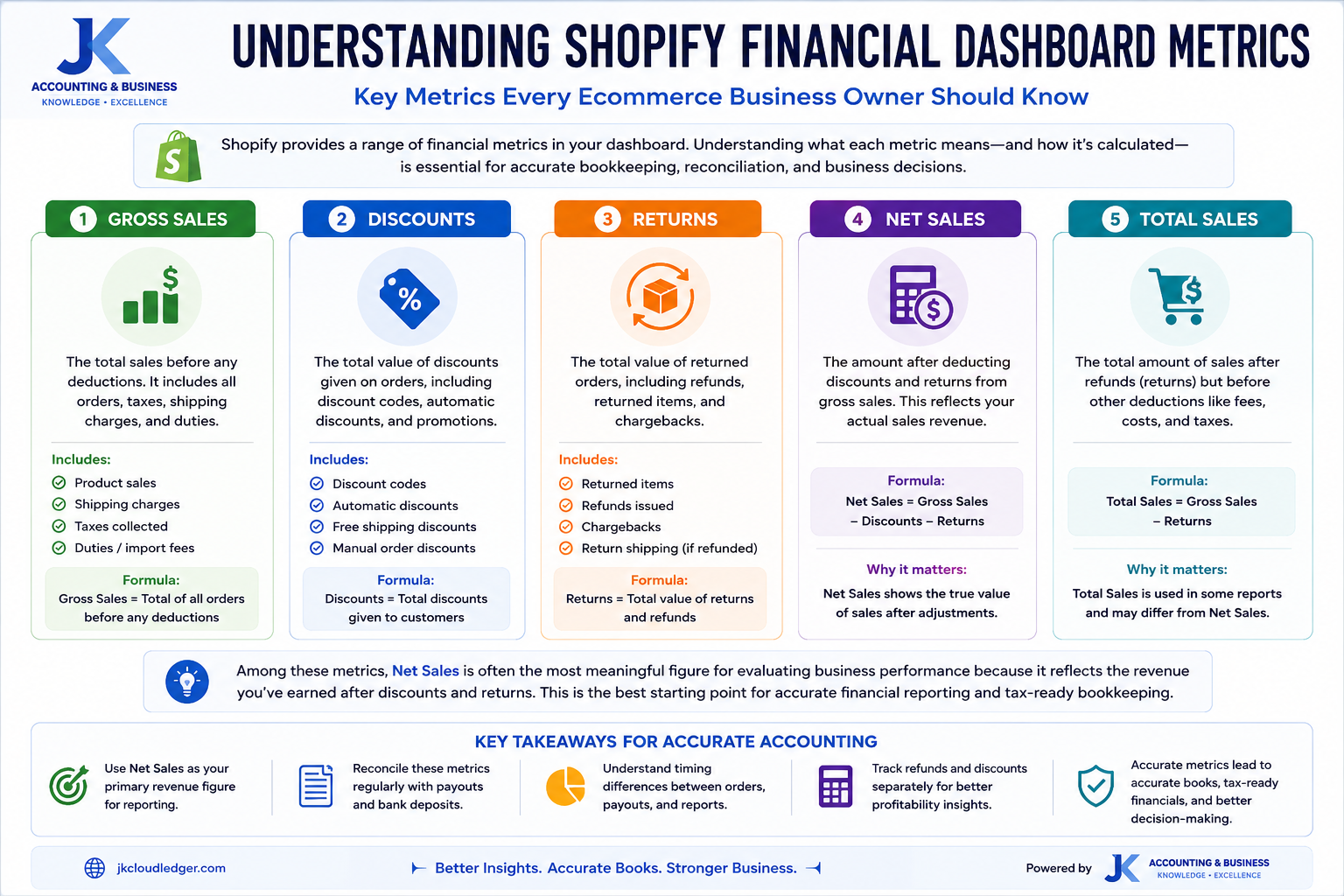
One of the most common misconceptions among Shopify merchants is assuming that every number displayed in the Shopify dashboard represents revenue. While the dashboard provides an excellent operational overview, its primary purpose is business reporting rather than accounting. Without understanding how each financial metric is calculated, business owners can easily overestimate revenue, underestimate expenses, or make decisions based on incomplete financial information.The Finances section inside Shopify summarizes your store’s performance using several related metrics. Each figure serves a different purpose, and understanding the relationship between them is essential for accurate bookkeeping, financial reporting, and tax preparation.
| Shopify Metric | What It Represents | Accounting Interpretation |
|---|
| Gross Sales | Total value of products sold before discounts, refunds, taxes, or shipping adjustments. | Starting point for revenue analysis but not final recognized revenue. |
| Discounts | Coupons, promotional offers, and automatic price reductions applied at checkout. | Recorded separately to measure marketing performance and promotional effectiveness. |
| Returns | Products refunded or returned by customers. | Recorded as Returns & Allowances, a contra-revenue account that reduces gross revenue. |
| Net Sales | Gross Sales minus Discounts and Returns. | Represents your actual operating revenue before shipping income and taxes. |
| Total Sales | Net Sales plus Shipping Charges and Sales Tax collected. | Total amount collected from customers, not the same as business income. |
Understanding how Shopify calculates Gross Sales, Net Sales, Returns, Discounts, and Total Sales helps ecommerce businesses produce more accurate financial reports and tax-ready bookkeeping.
Among these metrics, Net Sales is often the most meaningful figure for evaluating business performance because it reflects the revenue remaining after promotional discounts and customer refunds. However, accountants still separate shipping income, sales tax, merchant fees, and other adjustments into their own accounts to produce GAAP-compliant financial statements.For example, imagine your Shopify dashboard reports $25,000 in Total Sales. That figure may include $1,500 in shipping income and $2,100 in sales tax collected from customers. Neither amount necessarily represents revenue that belongs to your business. Shipping income may offset shipping expenses, while sales tax is typically recorded as a liability until it is remitted to the appropriate tax authority. Understanding these distinctions prevents businesses from overstating profitability and simplifies month-end financial reporting.As your business grows, relying solely on dashboard figures becomes increasingly risky. Professional bookkeeping systems reconcile Shopify reports with payment gateway settlements, bank deposits, inventory movements, and accounting software to create a complete and accurate financial picture.
Accounting Insight: The Shopify dashboard is an excellent operational reporting tool, but it should never replace your accounting system. Always reconcile Shopify reports with your payment gateways, bank statements, and QuickBooks Online before preparing financial statements or filing taxes.
Need Better Visibility Into Your Ecommerce Finances?
Learn how professional
Ecommerce Bookkeeping Services can help you reconcile Shopify reports, payment gateways, and QuickBooks Online while giving you complete financial clarity.
Common Shopify Reconciliation Problems (And Why Your Bank Balance Doesn’t Match)
(Understanding why Shopify reports, payment gateways, and your bank account rarely show the same numbers.)
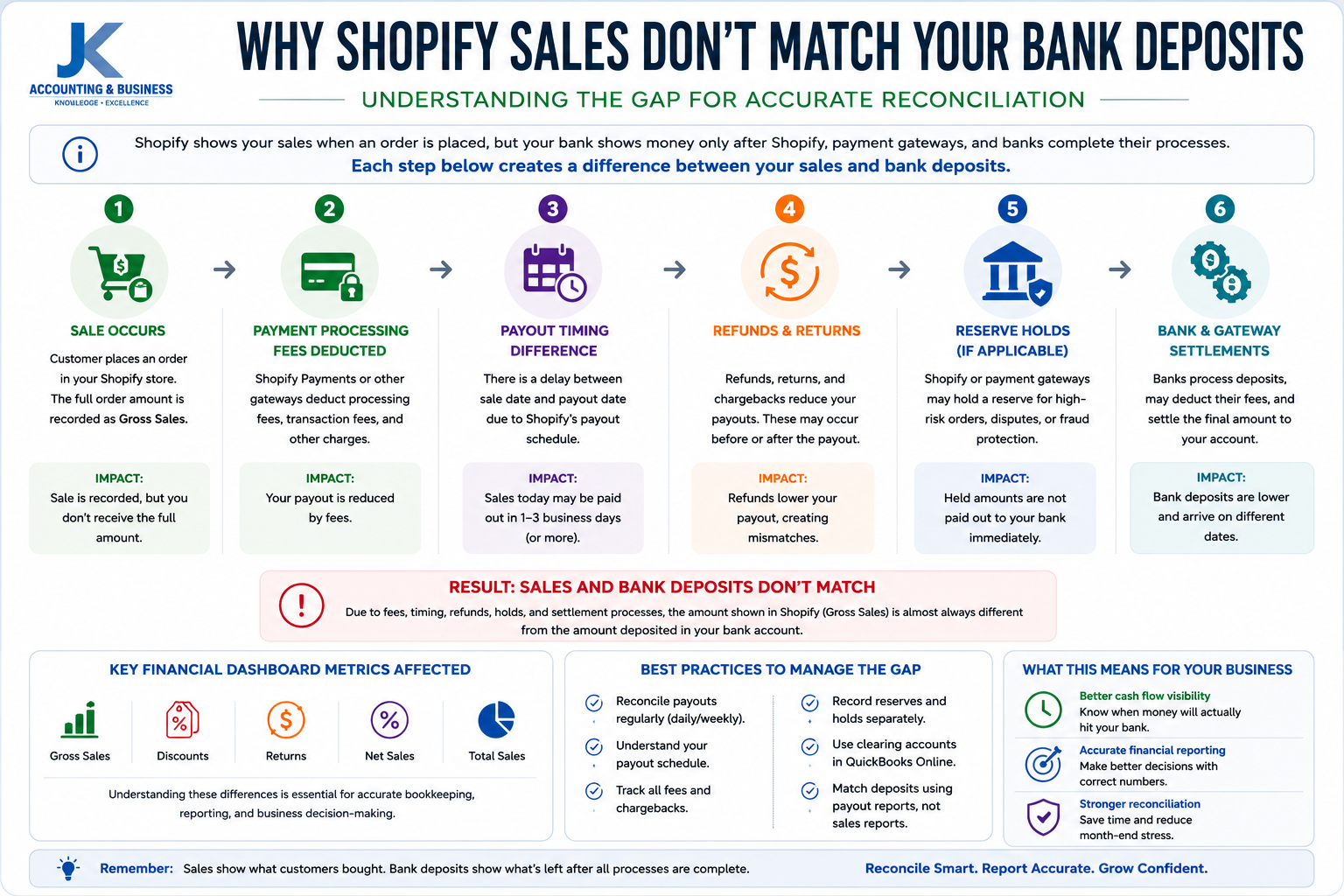
One of the most common questions ecommerce business owners ask is:“Why does Shopify show $12,540 in sales when only $11,812 arrived in my bank account?”The short answer is that Shopify reports sales, while your bank records cash deposits. These are two different financial events occurring at different stages of the transaction lifecycle.Professional accountants expect these numbers to differ. In fact, if every Shopify payout exactly matched your daily sales, it would usually indicate that processing fees, refunds, taxes, or settlement timing were not being recorded correctly.Understanding these differences is essential for accurate bookkeeping, successful month-end reconciliation, and GAAP-compliant financial reporting.
Shopify sales and bank deposits rarely match exactly because payment gateways deduct fees, process refunds, and settle payouts on different dates.
1. Timing Differences Between Sales and Payouts
Revenue is recognized when a customer completes an order, but payment processors usually transfer funds several business days later. For example, sales generated on March 31 may not reach your bank account until April 2 or April 3. Without accrual accounting and clearing accounts, monthly revenue can easily be overstated or understated.
2. Merchant Processing Fees
Every payment gateway deducts transaction fees before issuing your payout. Shopify Payments, Stripe, PayPal, and Amazon Pay all have different pricing models, meaning the amount deposited into your bank is almost always lower than your gross customer payments. These fees should be recorded as operating expenses rather than reducing revenue.
3. Customer Refunds and Chargebacks
Refunds introduce another layer of complexity. A refund issued today may not affect your payout until several days later. Likewise, chargebacks can temporarily remove funds while payment providers investigate disputes. Proper reconciliation ensures these adjustments are reflected accurately within your accounting records.
4. Reserve Balances and Payment Holds
Certain payment providers—particularly PayPal—may temporarily retain a percentage of your funds as a reserve to manage fraud and chargeback risk. These reserve balances remain assets of your business but are not immediately available as cash. Recording reserve balances separately prevents discrepancies during reconciliation.
Best Practice: Rather than manually tracing every payout, use reconciliation automation tools such as A2X or Link My Books. These platforms summarize Shopify transactions, merchant fees, taxes, refunds, and payouts into accounting entries that reconcile directly with QuickBooks Online.
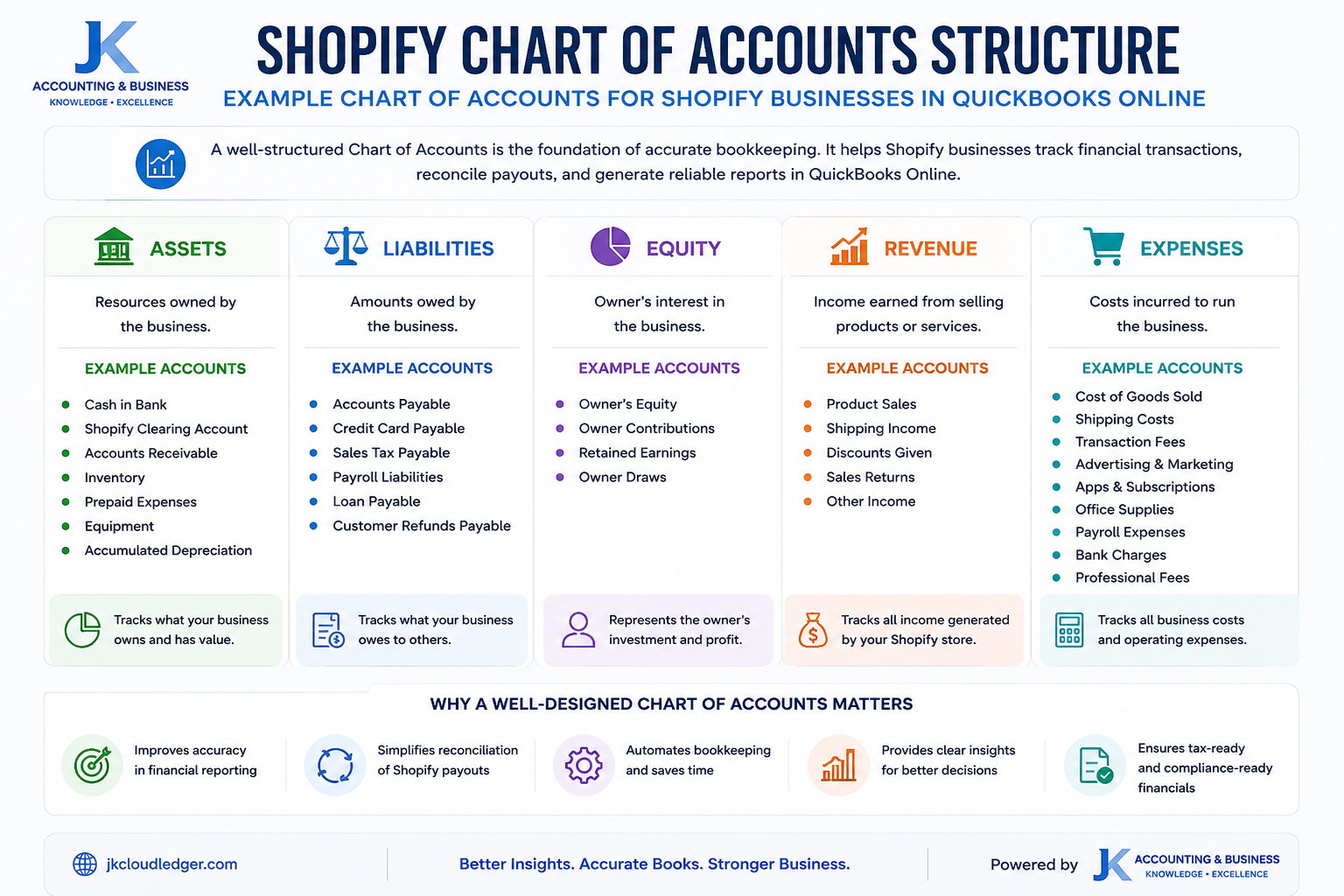
The Ultimate Chart of Accounts (COA) for Shopify Businesses
(A properly designed Chart of Accounts creates cleaner financial reports, easier reconciliations, and better business decisions.)
Your Chart of Accounts (COA) is the foundation of your accounting system. Every sale, expense, inventory movement, tax liability, and payout eventually maps into one of these accounts. A poorly structured COA creates confusing financial statements, while a well-designed structure provides meaningful insights into profitability, cash flow, and operational performance.Although every ecommerce business has unique requirements, the following structure represents a practical starting point for most Shopify merchants using QuickBooks Online.
| Account Category | Account Code | Account Name | Purpose |
|---|
| Assets | 1000 | Cash in Bank | Business operating bank account. |
| 1100 | Shopify Clearing | Temporary settlement account. |
| 1110 | PayPal Clearing | Tracks PayPal settlements. |
| 1200 | Inventory Asset | Current inventory value. |
| Liabilities | 2000 | Sales Tax Payable | Tax collected from customers. |
| 2100 | Gift Card Liability | Outstanding gift card balances. |
| 2200 | Accounts Payable | Supplier invoices awaiting payment. |
| Equity | 3000 | Owner’s Equity | Owner investment. |
| 3100 | Retained Earnings | Accumulated business profits. |
| Revenue | 4000 | Product Sales | Primary product revenue. |
| 4100 | Shipping Income | Shipping charges collected. |
| 4200 | Discounts Given | Contra-revenue account. |
| 4300 | Returns & Allowances | Refund tracking account. |
| Expenses | 5000 | Cost of Goods Sold (COGS) | Inventory costs. |
| 6000 | Merchant Processing Fees | Payment gateway charges. |
| 6100 | Shopify Subscription Fees | Platform subscription expense. |
| 6200 | Marketing & Advertising | Ad spend and ROAS tracking. |
A well-designed Chart of Accounts helps Shopify businesses organize financial data, automate bookkeeping, and produce accurate management reports.
As your ecommerce business expands, your Chart of Accounts will naturally evolve. Many merchants eventually create separate revenue accounts for wholesale sales, international sales, subscription products, marketplace revenue, and other income streams. Likewise, operating expenses are often broken down into advertising, software subscriptions, shipping expenses, fulfillment costs, merchant fees, and payroll to provide deeper visibility into profitability.Maintaining a clean and scalable Chart of Accounts not only improves financial reporting but also enables automation tools like A2X, Link My Books, and QuickBooks Online to categorize transactions consistently. The result is faster month-end closes, simpler tax preparation, and more reliable business insights.
Professional Recommendation: Review your Chart of Accounts at least once each year. As your Shopify business grows, new revenue streams, payment gateways, and operating expenses should be reflected in your accounting structure to maintain accurate reporting and support better financial decision-making.
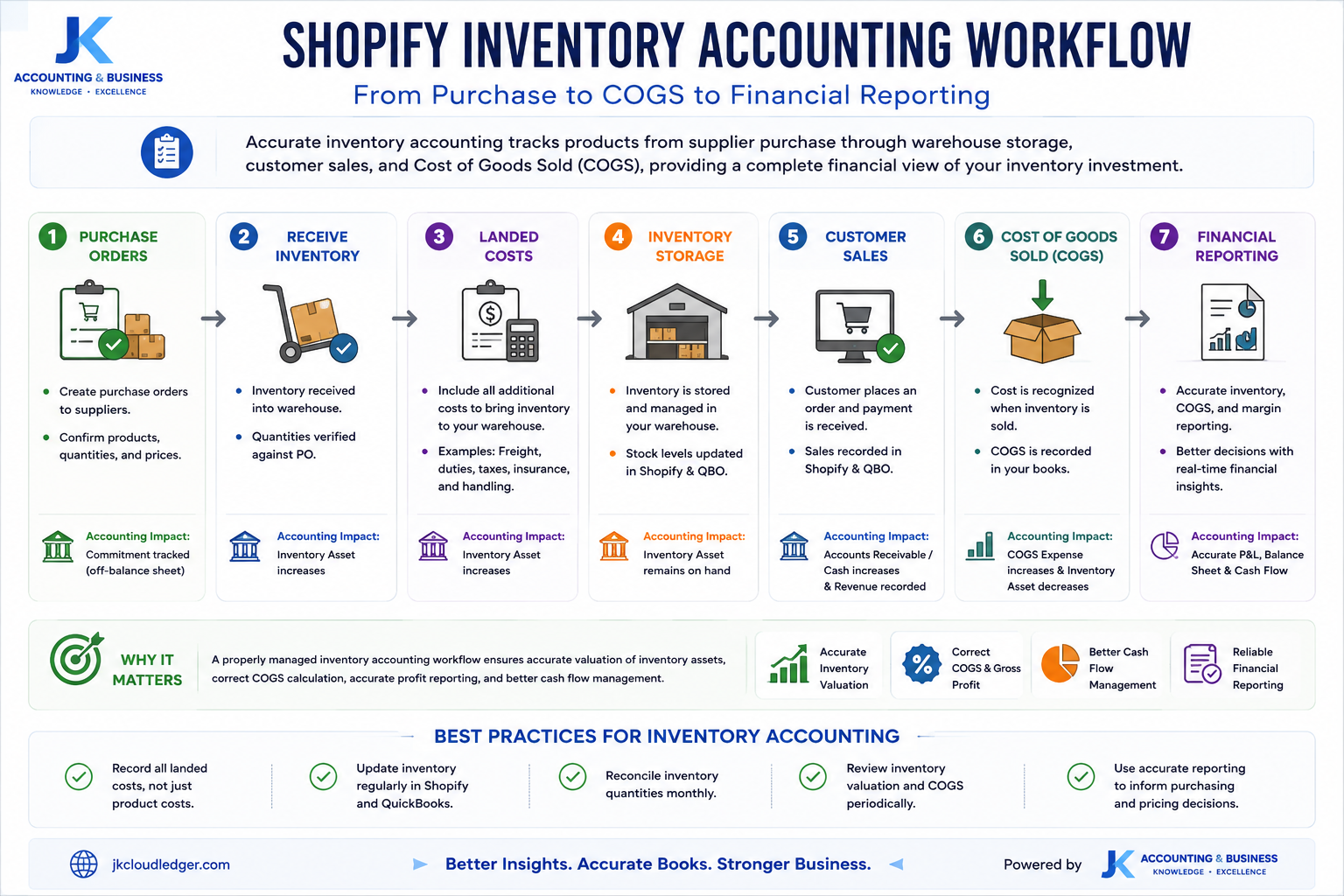
Inventory Management for Shopify: It’s More Than Just Counting Products
(Your inventory isn’t just stock on a shelf—it’s one of the largest assets on your balance sheet.)
For many Shopify businesses, inventory represents the largest investment on the balance sheet. Yet it’s also one of the most misunderstood areas of ecommerce accounting. Successful inventory management isn’t simply about knowing how many products remain in your warehouse—it involves accurately measuring the financial value of those products, recognizing inventory costs at the correct time, and ensuring every inventory movement is reflected in your accounting records.Poor inventory accounting can lead to overstated profits, inaccurate Cost of Goods Sold (COGS), cash flow problems, and unexpected tax liabilities. As highlighted by the U.S. Small Business Administration (SBA), maintaining accurate inventory records is essential for financial reporting, operational planning, and sustainable business growth.[10]Whether you’re fulfilling orders from your own warehouse or using third-party logistics providers (3PLs), inventory should always be treated as a financial asset—not simply a collection of products waiting to be sold.
Accurate inventory accounting tracks products from supplier purchase through warehouse storage, customer sales, and Cost of Goods Sold (COGS), providing a complete financial view of your inventory investment.
1. Understand Your True Landed Cost
One of the biggest accounting mistakes Shopify merchants make is recording only the supplier’s invoice price as inventory cost. In reality, the true cost of inventory extends far beyond the purchase price.Landed Cost includes every expense required to move inventory from your supplier to your warehouse, including:
Typical Landed Cost Components
- Supplier purchase price
- Ocean or air freight charges
- Shipping insurance
- Import duties and customs tariffs
- Brokerage and customs clearance fees
- Warehouse receiving costs
- Product inspection or quality control expenses
Ignoring these costs artificially inflates gross profit because Cost of Goods Sold becomes understated. According to Avalara, excluding duties, tariffs, and freight from inventory valuation often leads to inaccurate margin calculations and misleading financial reports.[11]
Inventory Insight: Always calculate inventory using total landed cost rather than supplier cost alone. This produces more realistic gross margins and improves pricing decisions.
2. Monitor Inventory Shrinkage and Spoilage
Inventory records rarely remain perfectly accurate forever. Products may become damaged during transportation, misplaced inside warehouses, stolen, expired, or written off due to quality issues. These differences between recorded inventory and actual inventory are known as inventory shrinkage.Regular inventory cycle counts—performed monthly or quarterly—help identify discrepancies before they become significant financial problems. Whenever shrinkage is identified, businesses should adjust both inventory quantities and inventory value within their accounting system.These adjustments reduce the Inventory Asset account while recognizing an expense on the Profit & Loss Statement, ensuring financial reports accurately reflect the true value of inventory held.
3. Choose the Right Inventory Valuation Method
Inventory valuation directly affects Cost of Goods Sold, taxable income, and reported profitability. For most Shopify businesses, two valuation methods are commonly used.
| Method | How It Works | Best For |
|---|
| FIFO (First-In, First-Out) | The oldest inventory purchased is assumed to be sold first. | Most ecommerce retailers and GAAP-compliant financial reporting. |
| Weighted Average Cost | Inventory costs are averaged every time new stock is received. | Businesses with frequent supplier price fluctuations. |
Whichever valuation method you choose, consistency is critical. Changing valuation methods frequently makes historical comparisons difficult and may create compliance issues. The Financial Accounting Standards Board (FASB) recommends applying inventory valuation policies consistently from one accounting period to the next.[12]
4. Track Inventory in Transit Correctly
Inventory doesn’t suddenly appear the moment you pay your supplier. Large international shipments may spend several weeks traveling by sea or air before reaching your warehouse.Instead of immediately recording supplier payments as expenses, accountants normally classify these purchases as Inventory in Transit, a temporary asset account representing inventory that has been purchased but not yet received.Once goods arrive, pass inspection, and become available for sale, the balance is transferred into your Inventory Asset account. This ensures your balance sheet reflects every inventory asset owned by the business—even products still travelling across the world.
Example Inventory Flow
| Stage | Accounting Treatment |
|---|
| Supplier Payment | Record as Inventory in Transit (Asset). |
| Shipment Arrives | Transfer Inventory in Transit to Inventory Asset. |
| Customer Purchase | Move Inventory Asset to Cost of Goods Sold (COGS). |
Businesses that understand inventory from both an operational and accounting perspective gain a significant competitive advantage. Accurate inventory valuation supports better purchasing decisions, improves cash flow planning, reduces tax surprises, and produces more reliable profitability reports.If you’d like to avoid common inventory and bookkeeping mistakes, explore our guide on
7 Ecommerce Bookkeeping Mistakes USA Sellers Must Avoid, where we explain the most common financial errors affecting growing ecommerce businesses.
Professional Recommendation: Treat inventory as a financial asset—not simply products sitting in a warehouse. Businesses that maintain accurate inventory valuation, landed costs, and COGS reporting are better positioned to improve margins, optimize purchasing decisions, and scale profitably.
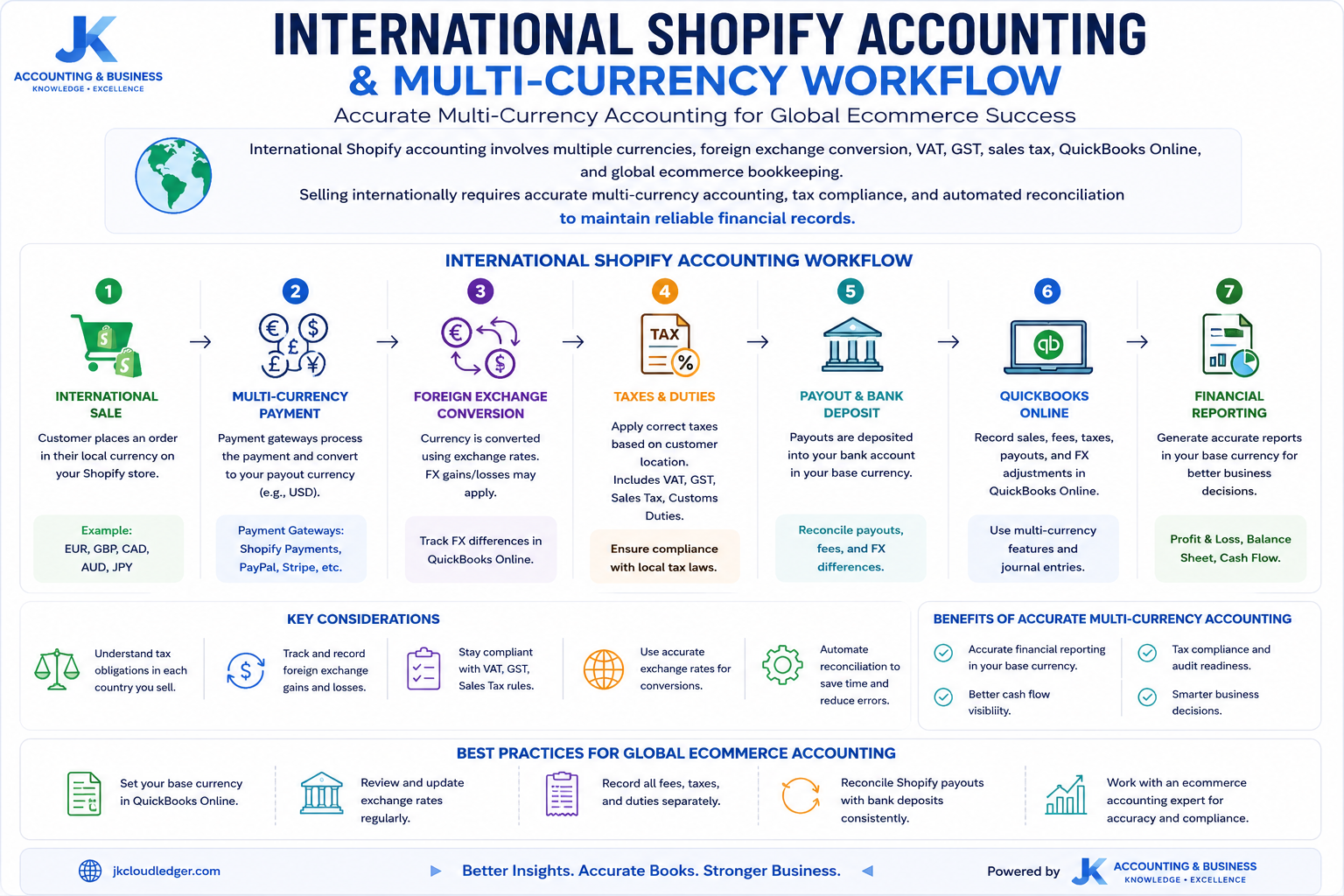
Multi-Currency Accounting and International Tax Compliance
(Selling globally introduces foreign exchange, VAT, GST, and sales tax challenges that every Shopify business must manage correctly.)
Expanding your Shopify store into international markets creates exciting growth opportunities, but it also introduces new accounting complexities. Selling products across multiple countries means dealing with foreign currencies, fluctuating exchange rates, international tax regulations, and jurisdiction-specific reporting requirements.Without a structured accounting system, exchange rate differences and tax obligations can quickly distort your financial statements, create reconciliation issues, and expose your business to costly compliance risks. Fortunately, modern accounting platforms such as QuickBooks Online, combined with ecommerce automation tools like A2X and Link My Books, simplify much of this complexity by automating currency conversions, settlement reporting, and tax mappings.
Selling internationally requires accurate multi-currency accounting, tax compliance, and automated reconciliation to maintain reliable financial records.
Multi-Currency Accounting for Shopify
If your Shopify store accepts payments in one currency while your accounting records or business bank account operate in another, exchange rate fluctuations become part of your bookkeeping process.For example, your Shopify storefront may sell products in US Dollars (USD), while your business operates from Canada using Canadian Dollars (CAD). Between the time a customer places an order and the day Shopify transfers your payout, exchange rates may change. These fluctuations create foreign exchange gains or losses that should be recorded separately within your accounting system.
| Exchange Difference | Description | Accounting Treatment |
|---|
| Realized Gain / Loss | Difference between the exchange rate on the sale date and the payout date. | Recognized when the foreign currency transaction is settled. |
| Unrealized Gain / Loss | Value changes on foreign currency balances held at month-end. | Recorded through period-end revaluation adjustments. |
Best Practice: Maintain a single base currency inside QuickBooks Online and allow approved ecommerce automation tools to manage exchange rate calculations and foreign currency journal entries automatically.
Managing International Tax Compliance
Tax compliance becomes significantly more complex once your Shopify business begins selling internationally. Every country applies different indirect tax rules, registration thresholds, filing requirements, and reporting standards. Maintaining accurate bookkeeping helps ensure taxes are collected, reported, and remitted correctly while reducing audit risk.
1. Sales Tax (United States)
In the United States, businesses generally become responsible for collecting sales tax after establishing sales tax nexus. Nexus may arise from maintaining a physical presence—such as an office, warehouse, or employee—or by exceeding a state’s economic thresholds through online sales.Many states apply economic nexus thresholds around $100,000 in annual sales or 200 individual transactions, although exact requirements differ by jurisdiction. Once registered, businesses must collect sales tax from customers, record the liability accurately, and remit collected taxes to the appropriate state authority.
2. VAT (United Kingdom & European Union)
Unlike the United States, Value Added Tax (VAT) is often included within the advertised selling price. Businesses selling into the UK or European Union must determine whether VAT registration is required based on local legislation and whether they qualify as resident or non-resident sellers.Because VAT forms part of the product price rather than being added separately at checkout, failing to separate VAT correctly can significantly overstate reported revenue while understating tax liabilities and reducing actual profit margins.
3. GST (Canada & Australia)
Countries such as Canada and Australia apply Goods and Services Tax (GST), although the administration differs between jurisdictions. Canadian businesses may also need to account for Provincial Sales Tax (PST) or Harmonized Sales Tax (HST), while Australian businesses generally register for GST after exceeding the applicable turnover threshold.Accurate bookkeeping separates GST collected from operating revenue, ensuring taxes remain recorded as liabilities until remitted to the relevant government authority.
4. Marketplace Facilitator Rules
Marketplace Facilitator legislation has added another layer of complexity for ecommerce businesses. In many jurisdictions, online marketplaces or platforms collect and remit sales tax on behalf of sellers. However, this does not remove the seller’s responsibility to maintain accurate accounting records.Businesses must continue reporting marketplace-facilitated sales separately while ensuring revenue, facilitated taxes, and tax liabilities reconcile correctly within their accounting system. Failure to report facilitated sales accurately may create inconsistencies between financial records and tax filings.
| Region | Primary Tax | Important Accounting Consideration |
|---|
| United States | Sales Tax | Track Nexus, Sales Tax Payable, and Marketplace Facilitator sales separately. |
| United Kingdom | VAT | Separate VAT from revenue and monitor registration thresholds. |
| European Union | VAT / OSS | Maintain country-specific VAT reporting where applicable. |
| Canada | GST / HST / PST | Track multiple provincial tax obligations accurately. |
| Australia | GST | Monitor GST registration threshold and liability reporting. |
As ecommerce businesses expand internationally, financial reporting becomes far more than simply recording sales. Currency conversions, indirect taxes, payment gateway settlements, and marketplace regulations must all work together within a single accounting system.Businesses using structured bookkeeping workflows, cloud accounting software, and automated reconciliation tools are better positioned to enter new markets confidently while maintaining accurate financial statements and remaining compliant across multiple tax jurisdictions.To learn how QuickBooks Online supports global ecommerce accounting, explore our guide on
QuickBooks Online: The Central Hub for Ecommerce Accounting.
Global Accounting Tip: Never rely solely on Shopify tax reports when operating internationally. Always reconcile marketplace data, payment gateways, accounting software, and local tax requirements to ensure complete compliance and accurate financial reporting.
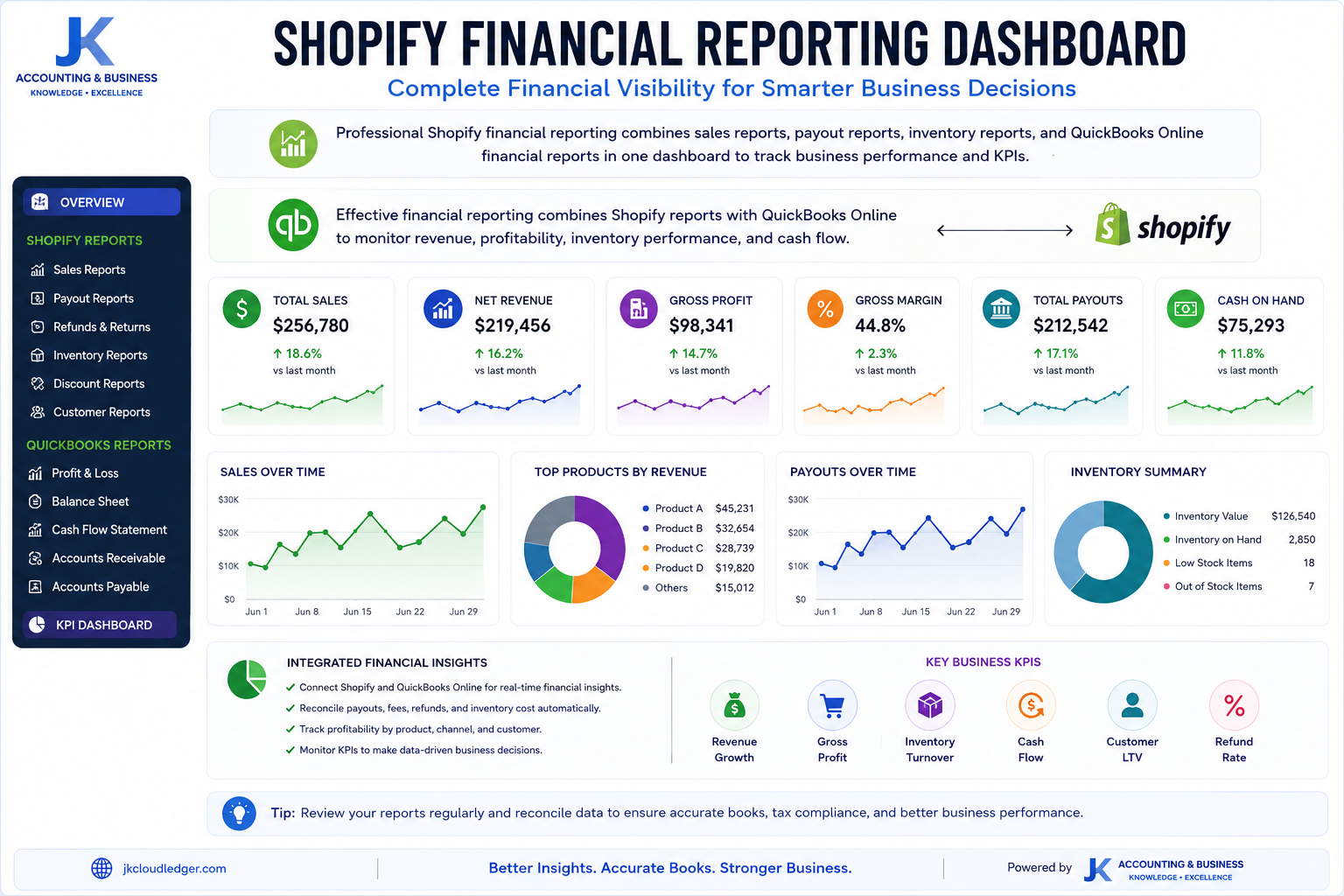
Essential Shopify Reports, KPIs & Automation for Smarter Financial Decisions
(Your accounting system should do more than record transactions—it should help you make better business decisions.)
Recording sales accurately is only one part of ecommerce accounting. The real value comes from transforming financial data into meaningful business insights. Shopify provides dozens of built-in reports, but knowing which reports matter—and how to interpret them—can significantly improve profitability, cash flow management, and strategic planning.Professional ecommerce businesses combine Shopify reporting with QuickBooks Online financial statements to create a complete financial dashboard. Rather than relying solely on sales totals, they monitor profitability, marketing performance, inventory efficiency, and cash flow using carefully selected Key Performance Indicators (KPIs).
Effective financial reporting combines Shopify reports with QuickBooks Online to monitor revenue, profitability, inventory performance, and cash flow.
Essential Shopify Financial Reports
Rather than reviewing only the “Total Sales” figure displayed on your Shopify dashboard, business owners should regularly analyze several financial reports that provide deeper operational insights.
| Report | Purpose | Business Value |
|---|
| Sales Finance Report | Shows Gross Sales, Net Sales, Discounts, Returns and Taxes. | Measures true revenue performance. |
| Payments Finance Report | Displays payment gateway activity and settlement details. | Simplifies payout reconciliation. |
| Payout Report | Lists every payout transferred to your bank account. | Supports accurate bank reconciliation. |
| Inventory Report | Shows quantity available and inventory movements. | Supports inventory valuation and COGS calculations. |
Reporting Tip: Never rely on dashboard sales totals alone. Always compare Shopify reports with QuickBooks Online financial statements and bank reconciliations before closing each accounting period.
The Ecommerce KPI Dashboard Every Shopify Business Should Monitor
Financial statements explain what happened. Key Performance Indicators (KPIs) explain why it happened. Monitoring these metrics consistently allows business owners to improve pricing, marketing, inventory purchasing, and overall profitability.
| KPI | Formula | Why It Matters |
|---|
| Gross Margin | (Revenue − COGS) ÷ Revenue | Measures product profitability. |
| Contribution Margin | Gross Profit − Variable Marketing Costs | Evaluates marketing efficiency. |
| Average Order Value (AOV) | Total Revenue ÷ Orders | Measures customer purchasing behaviour. |
| ROAS | Revenue from Ads ÷ Advertising Cost | Measures advertising effectiveness. |
| Customer Lifetime Value (LTV) | Expected Lifetime Profit per Customer | Supports long-term growth planning. |
| Customer Acquisition Cost (CAC) | Total Marketing Cost ÷ New Customers | Measures acquisition efficiency. |
| Inventory Turnover | COGS ÷ Average Inventory | Measures inventory performance. |
| Operating Margin | Net Profit ÷ Revenue | Measures overall business profitability. |
Businesses that monitor financial KPIs regularly identify profitability trends faster and make better inventory, pricing, and marketing decisions.
The Gold Standard Ecommerce Automation Workflow
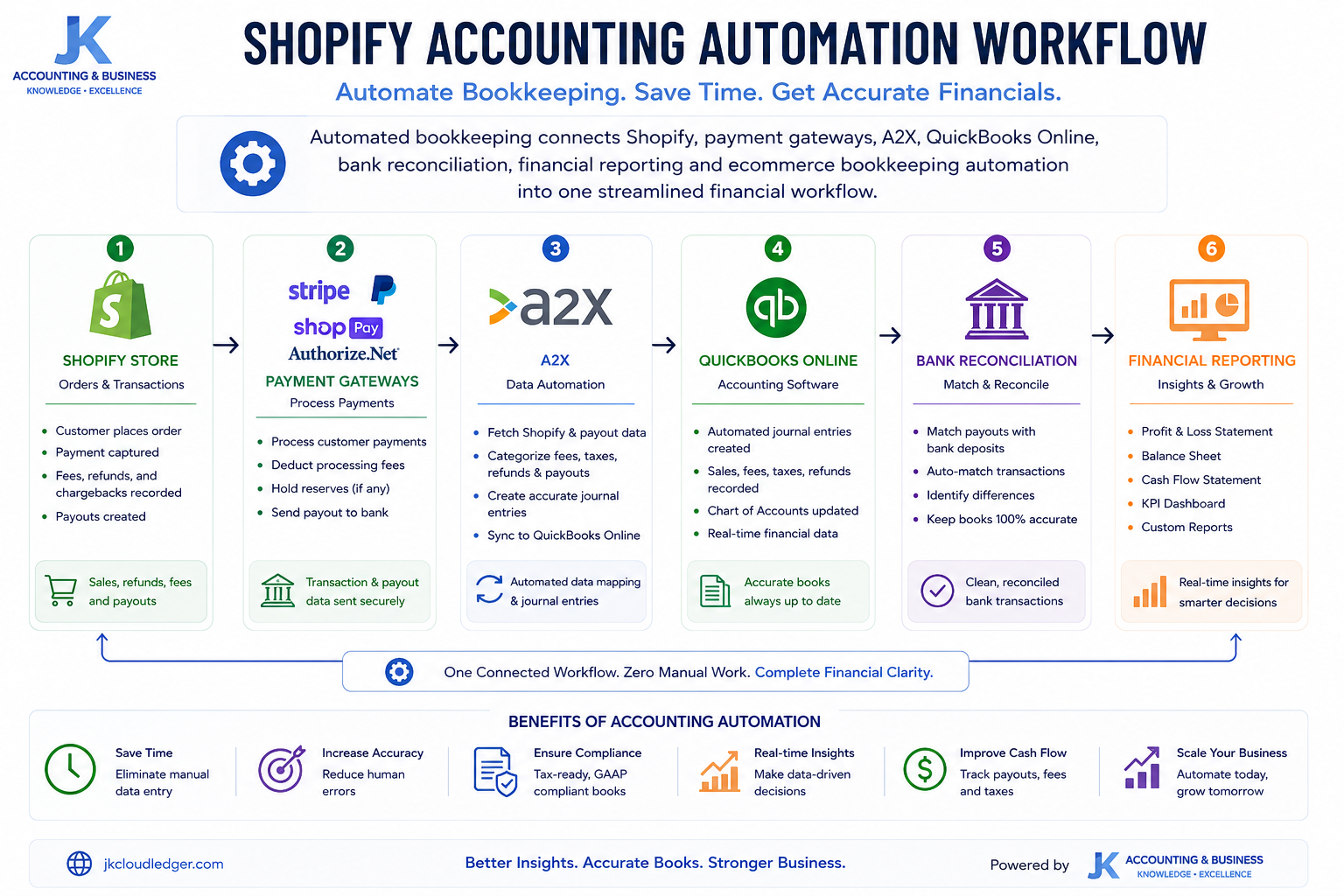
As transaction volume increases, manual bookkeeping quickly becomes unsustainable. Recording every order, refund, fee, tax adjustment, and payout manually introduces unnecessary errors while consuming valuable business time.The most efficient Shopify accounting workflow combines automation with professional financial oversight. Instead of manually importing spreadsheets, modern ecommerce businesses connect every platform into a single accounting ecosystem that updates automatically throughout the month.
Automated bookkeeping connects Shopify, payment gateways, accounting software, and bank reconciliation into one streamlined financial workflow.
Recommended Automation Workflow
- Customer places an order through Shopify.
- Payment is processed by Shopify Payments, Stripe, PayPal or other gateways.
- A2X or Link My Books summarizes settlement data automatically.
- Journal entries are posted directly into QuickBooks Online.
- Bank deposits reconcile automatically using clearing accounts.
- Financial reports update continuously with minimal manual intervention.
This integrated workflow significantly reduces manual bookkeeping, improves reconciliation accuracy, shortens month-end closing, and provides real-time financial visibility. Rather than spending hours correcting spreadsheets, business owners can focus on inventory planning, pricing strategy, customer acquisition, and sustainable growth.For growing Shopify businesses, automation is no longer a convenience—it has become a critical component of scalable ecommerce accounting.
Automation Insight: Combining Shopify, QuickBooks Online, A2X, and automated bank reconciliation dramatically reduces bookkeeping errors while creating reliable financial reports that support better business decisions.
Month-End Shopify Bookkeeping Checklist
(Consistency is the foundation of audit-ready financial records.)
Automated bookkeeping dramatically reduces manual work, but it doesn’t eliminate the need for monthly financial reviews. Before closing each accounting period, every Shopify business should complete a structured month-end checklist to verify that revenue, expenses, inventory, taxes, and bank transactions have been recorded accurately. Performing these checks consistently helps maintain reliable financial statements, simplifies tax preparation, and ensures your books remain audit-ready as your business grows.
Best Practice: Completing this checklist every month improves reconciliation accuracy, strengthens internal financial controls, reduces audit risk, and ensures management decisions are based on reliable financial data.
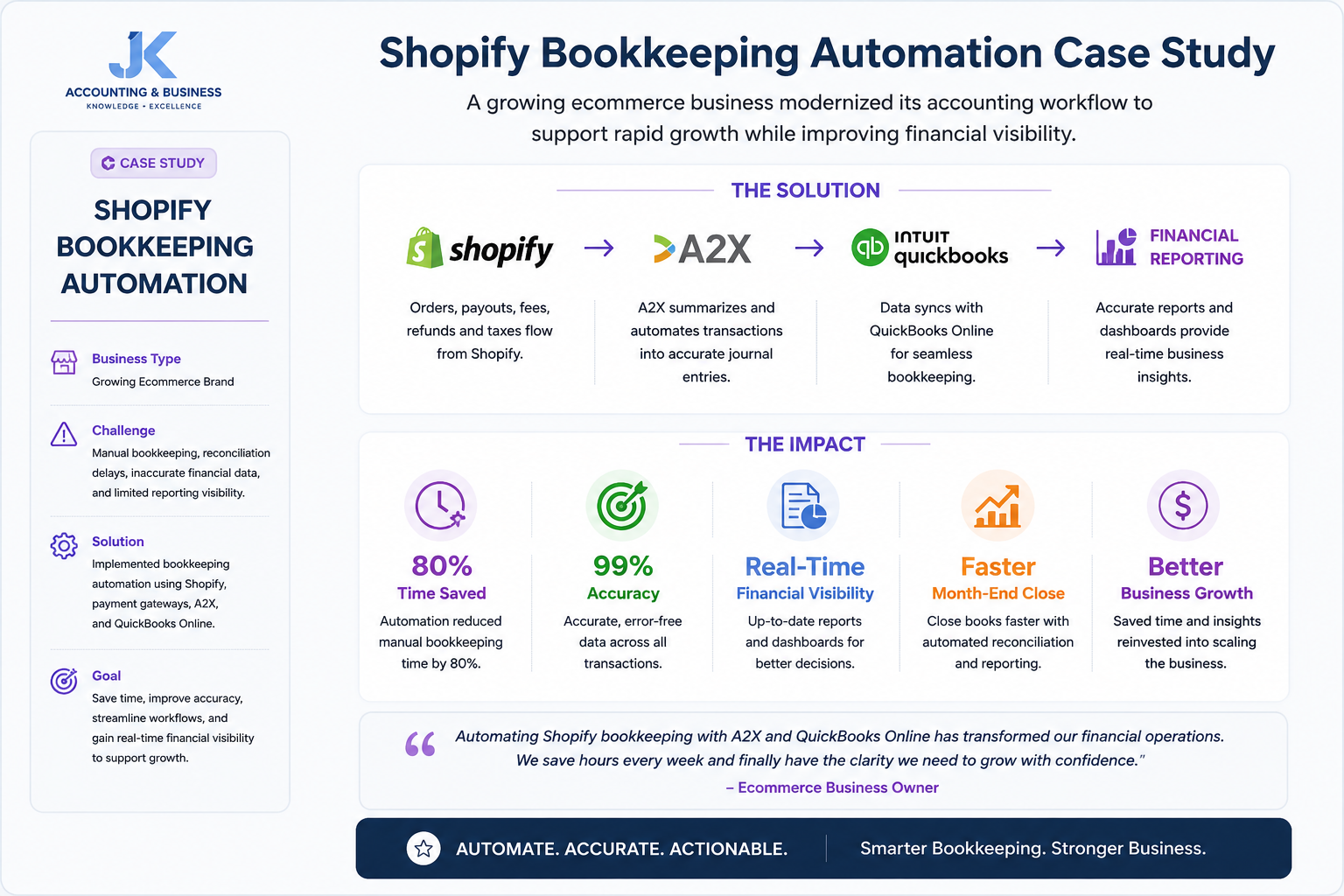
Case Study: Scaling a Shopify Business from 100 to 1,000 Orders Per Day
(How automation transformed bookkeeping from a bottleneck into a competitive advantage.)
As order volume increases, bookkeeping complexity grows exponentially. What starts as a few manual journal entries quickly becomes thousands of transactions spread across Shopify Payments, Stripe, PayPal, inventory movements, shipping costs, merchant fees, refunds, and sales tax obligations.The following example illustrates how a growing ecommerce business modernized its accounting workflow to support rapid growth while improving financial visibility.
Automating Shopify bookkeeping allows growing ecommerce businesses to spend less time on administration while gaining greater financial visibility.
Business Profile
| Business | Industry | Daily Orders |
|---|
| EcoTrend Apparel | Direct-to-Consumer Apparel | 100 → 1,000 Orders Per Day |
The Challenge
At approximately 100 daily orders, the founder spent nearly five hours every week manually importing transactions into QuickBooks Online. As order volume increased beyond 500 orders per day, bookkeeping fell several months behind, making financial reporting unreliable.By the time the business exceeded 1,000 daily orders, management could no longer determine true profitability because marketplace fees, refunds, inventory costs, and payment gateway settlements were being recorded inconsistently.
The Solution
The Results
| Outcome | Business Impact |
|---|
| Administrative Time | Reduced by more than 20 hours per month. |
| Profitability Visibility | Identified several high-volume products with negative contribution margins due to shipping costs. |
| Tax Compliance | Corrected sales tax configuration and eliminated unnecessary overpayments. |
| Financial Reporting | Monthly financial statements became accurate, timely, and management-ready. |
Business Lesson: As ecommerce businesses grow, investing in automation and professional bookkeeping often delivers greater long-term value than continuing manual accounting processes.
10 Shopify Bookkeeping Mistakes That Can Cost Your Business Thousands
(Most bookkeeping problems don’t happen because business owners ignore accounting—they happen because small mistakes compound over time.)
Growing Shopify businesses often encounter similar bookkeeping challenges regardless of industry or sales volume. Avoiding these common mistakes improves financial reporting, simplifies tax preparation, and supports healthier long-term growth.
Professional Advice: Most bookkeeping issues begin as small reconciliation errors. Reviewing your books every month prevents those small issues from becoming expensive financial problems later.
Final Thoughts: Build a Shopify Accounting System That Grows With Your Business
Successful Shopify businesses don’t rely on guesswork—they rely on accurate financial data. While sales dashboards provide a snapshot of revenue, they rarely tell the complete financial story. True business performance comes from understanding gross profit, Cost of Goods Sold (COGS), cash flow, inventory value, marketplace fees, sales tax liabilities, and customer acquisition costs through a structured bookkeeping system.Throughout this guide, we’ve explored the essential building blocks of professional Shopify accounting, including payout reconciliation, clearing accounts, inventory management, QuickBooks Online integration, multi-currency bookkeeping, financial reporting, automation workflows, and month-end reconciliation. When these processes work together, bookkeeping evolves from a compliance requirement into a strategic decision-making tool.Whether you’re processing 50 orders a month or several thousand orders each day, investing in accurate bookkeeping creates stronger financial visibility, improves profitability analysis, simplifies tax compliance, and gives you the confidence to scale sustainably.
Final Takeaways
- Use QuickBooks Online as the central accounting platform for your Shopify business.
- Record gross sales separately from fees, refunds, and payout deposits.
- Maintain dedicated clearing accounts for payment gateways.
- Track inventory, Cost of Goods Sold (COGS), and landed costs accurately.
- Automate bookkeeping with tools like A2X or Link My Books whenever possible.
- Complete a structured month-end reconciliation before closing your books.
- Monitor financial KPIs regularly to support smarter business decisions.
Financial clarity isn’t just about preparing tax returns—it’s about making better decisions every single day.
Need Help Managing Your Shopify Bookkeeping?
At JK Cloud Ledger, we help Shopify businesses build scalable bookkeeping systems using QuickBooks Online, automated payout reconciliation, ecommerce-specific Charts of Accounts, and reliable financial reporting. Whether you’re launching your first online store or managing a fast-growing multi-channel brand, our team can help you simplify bookkeeping and gain complete financial visibility.Schedule a Free Consultation