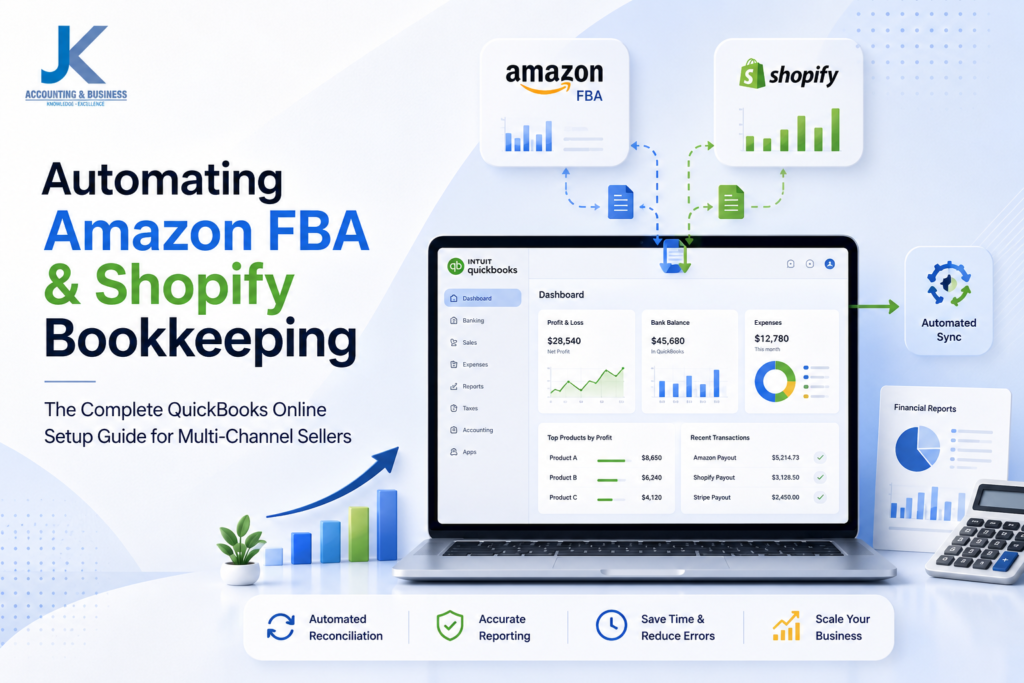
Automating Amazon FBA & Shopify Bookkeeping: The Complete QuickBooks Online Setup Guide
(Why successful multi-channel sellers automate their bookkeeping before manual processes slow their growth.)
Imagine starting your day with great news. You grab your morning coffee, check your Amazon Seller Central and Shopify dashboards, and discover you’ve generated more than $20,000 in sales overnight. Business is thriving, orders are flowing in, and everything looks like it’s moving in the right direction.Then, a few days later, you log into your business bank account expecting to see that same revenue reflected in your balance. Instead, the deposit is thousands of dollars lower than your reported sales. Where did the rest of the money go? Was it lost, delayed, or absorbed by marketplace fees, refunds, taxes, and fulfillment charges?This is a challenge that almost every growing ecommerce business encounters. While selling across Amazon FBA and Shopify creates more opportunities to reach customers, it also introduces a level of financial complexity that traditional bookkeeping methods simply weren’t designed to handle. Every sale can generate multiple financial transactions, including payment processing fees, marketplace commissions, fulfillment costs, customer refunds, advertising expenses, sales taxes, and inventory adjustments before a single payout reaches your bank account.What begins as a manageable number of weekly transactions can quickly grow into thousands of records spread across Amazon FBA, Shopify Payments, PayPal, Stripe, and other payment gateways. As sales increase, many business owners discover an uncomfortable reality: revenue is growing, but understanding where their cash is going becomes increasingly difficult. Relying solely on sales dashboards or manually entering transactions into QuickBooks Online often leads to reconciliation problems, reporting errors, and limited visibility into actual profitability.That is why successful ecommerce brands invest in automated bookkeeping workflows. By integrating Amazon FBA and Shopify with QuickBooks Online through automation platforms like A2X or Link My Books, businesses can transform thousands of complex marketplace transactions into clean, accurate accounting records that reconcile with their bank deposits and provide reliable financial insights for smarter decision-making.
Key Takeaways
- Marketplace payouts rarely match total sales because of fees, refunds, taxes, and fulfillment costs.
- Manual bookkeeping becomes increasingly difficult as transaction volume grows across multiple ecommerce platforms.
- QuickBooks Online provides a centralized accounting system for Amazon FBA and Shopify sellers.
- Automation tools like A2X and Link My Books simplify reconciliation by converting settlements into accurate journal entries.
- Automated bookkeeping improves financial visibility, saves time, and supports scalable ecommerce growth.
That’s why successful ecommerce businesses eventually move beyond spreadsheets and manual data entry. Instead, they build structured, automated bookkeeping workflows centered around
QuickBooks Online. The goal isn’t simply to save a few hours each week—it’s to create accurate, detailed, and audit-ready financial records that provide complete visibility into sales, fees, inventory costs, and cash flow.With the right automation in place, you can reconcile marketplace payouts faster, generate reliable financial reports, monitor profit margins with confidence, and make smarter decisions about pricing, inventory purchasing, and advertising spend. Rather than spending valuable time fixing bookkeeping errors, you can focus on growing your business.If you’re looking to build a stronger financial foundation for your online store, explore our
latest ecommerce accounting insights and bookkeeping resources, where we cover reconciliation, QuickBooks Online, financial reporting, and best practices for scaling multi-channel ecommerce businesses.
Quick Answer
If you sell on both Amazon FBA and Shopify, the most effective bookkeeping setup combines a cloud-based accounting platform with specialized ecommerce automation tools. This approach minimizes manual work, improves reconciliation accuracy, and provides reliable financial reporting as your business grows.
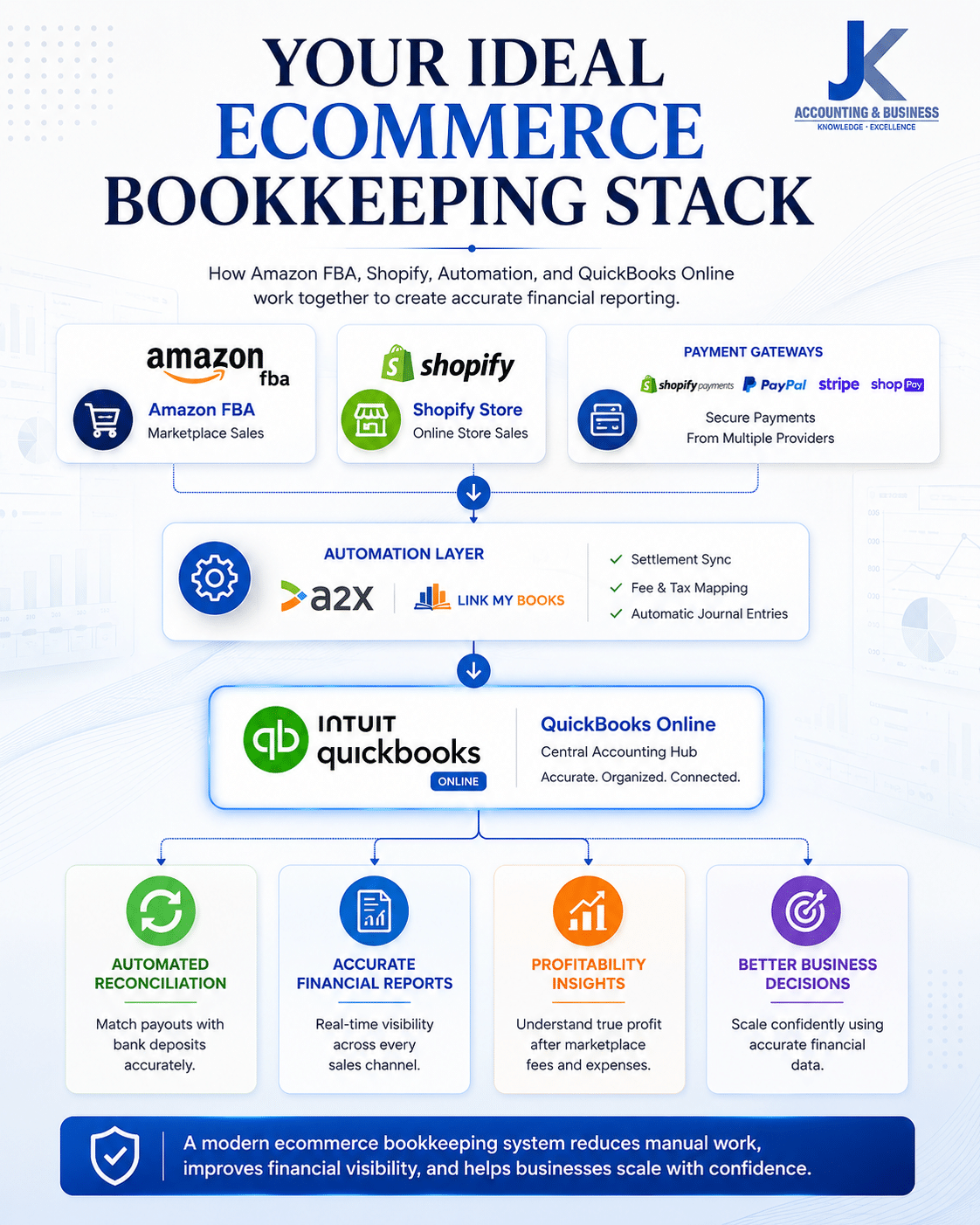
Your Ideal Ecommerce Bookkeeping Stack
- Core Accounting Platform: QuickBooks Online Plus or QuickBooks Online Advanced
- Automation Layer: A2X or Link My Books for automated settlement syncing
- Chart of Accounts: A dedicated ecommerce chart of accounts designed for Amazon, Shopify, fees, taxes, inventory, and payment gateways
- Monthly Workflow: Automated payout reconciliation, inventory adjustments, and profitability reviews
This structured workflow significantly reduces manual journal entries, improves gross and net profit reporting, simplifies month-end reconciliation, and gives growing ecommerce businesses the financial visibility needed to scale with confidence.

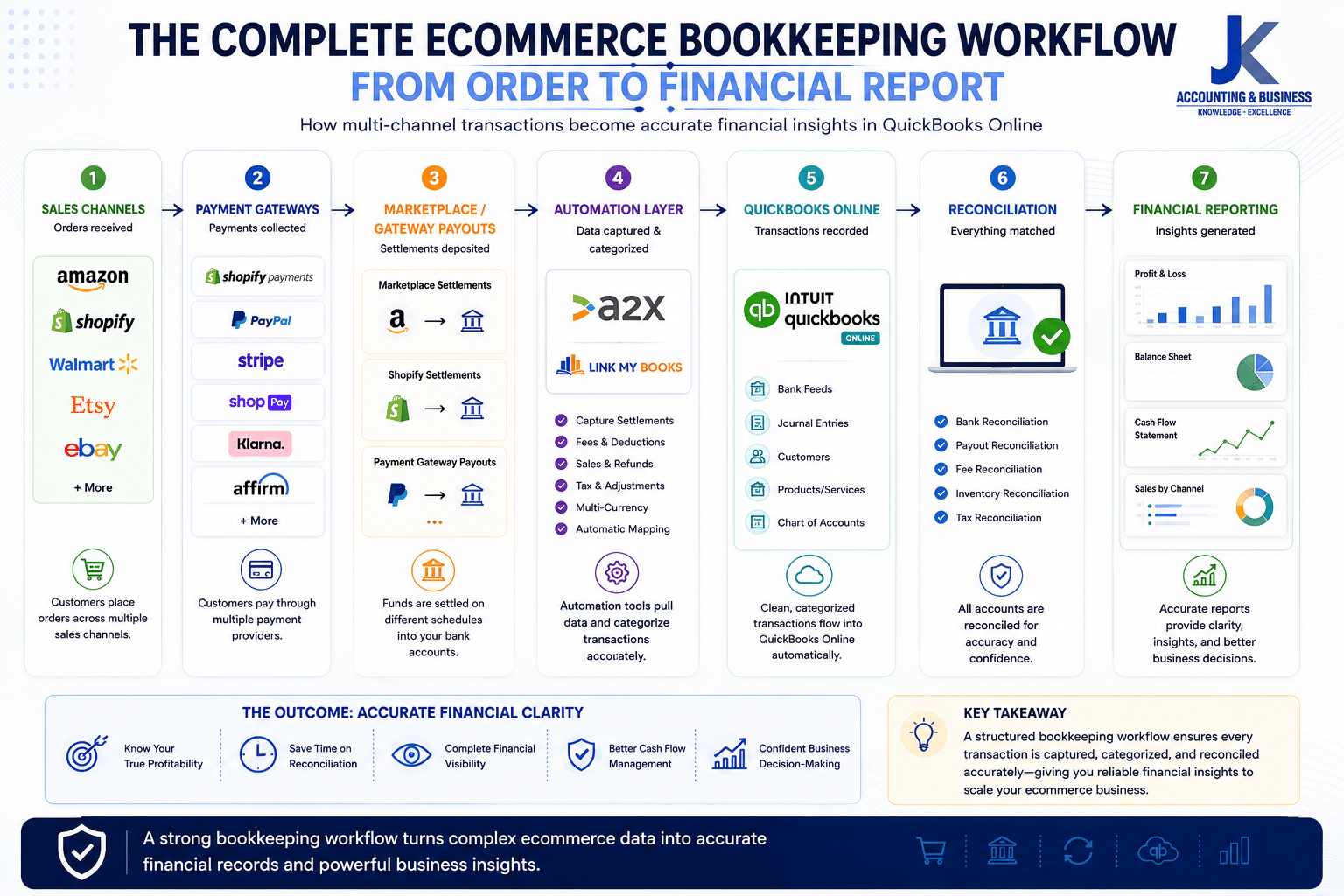
A modern ecommerce bookkeeping stack connects Amazon FBA, Shopify, payment gateways, A2X or Link My Books, and QuickBooks Online to automate reconciliation, improve financial reporting, and support scalable business growth.
Why Manual Bookkeeping Fails as Your Ecommerce Business Scales
(Growing sales shouldn’t mean growing bookkeeping headaches.)
Many ecommerce businesses begin their journey by managing their finances with spreadsheets, manual journal entries, or basic bookkeeping processes. During the early stages, this approach may be sufficient because transaction volumes remain relatively low and financial operations are easy to monitor.However, as your business expands across multiple sales channels like Amazon FBA and Shopify, bookkeeping becomes significantly more complex. Every customer order can generate multiple financial events—including marketplace commissions, payment processing fees, shipping charges, inventory movements, refunds, taxes, and advertising costs. Recording these transactions manually quickly becomes time-consuming and increases the likelihood of costly accounting errors.Instead of providing a clear picture of your business performance, manual bookkeeping often creates reconciliation issues, inaccurate financial reports, and limited visibility into your true profitability. This is one of the main reasons why growing ecommerce businesses transition to automated bookkeeping workflows integrated with QuickBooks Online.

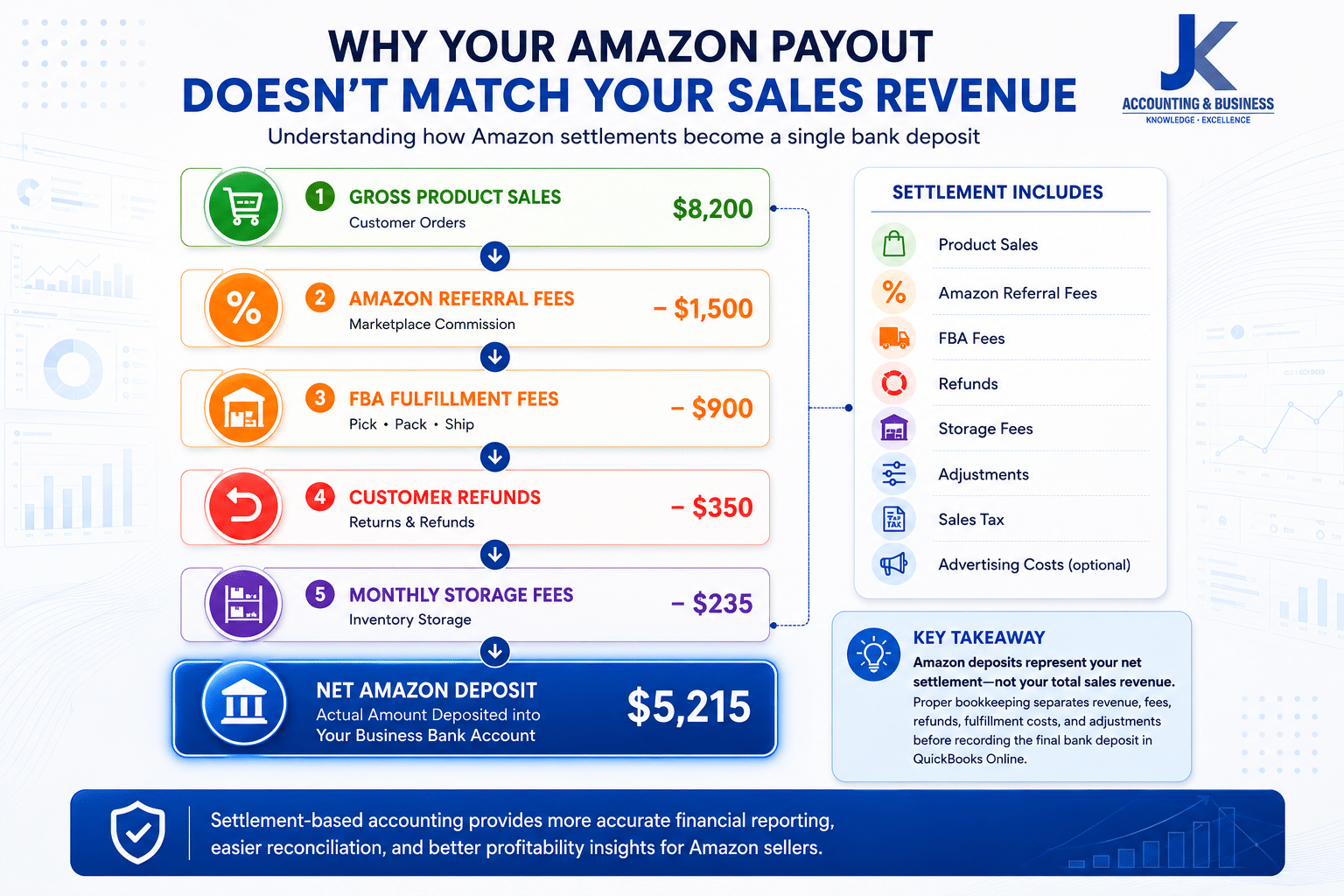
An Amazon payout is a net settlement, not total sales revenue. Separating sales, marketplace fees, fulfillment costs, refunds, and other deductions ensures accurate QuickBooks Online reconciliation and financial reporting.
The Amazon Settlement Problem
One of the biggest misconceptions among new Amazon sellers is assuming that every deposit received from Amazon represents their actual sales revenue.For example, imagine Amazon transfers $5,214.73 into your business bank account. At first glance, it may seem logical to record that amount as sales income. In reality, that deposit is simply the final settlement amount after Amazon has deducted numerous fees and adjustments.A single Amazon settlement typically combines dozens or even hundreds of individual transactions into one bank deposit. Unless each component is recorded separately, your financial statements can become highly misleading.
| Settlement Component | Accounting Category | Example Amount |
|---|
| Gross Product Sales | Sales Revenue | $8,200.00 |
| Amazon Referral Fees | Marketplace Expenses | ($1,500.00) |
| FBA Fulfillment Fees | Shipping & Fulfillment Costs | ($900.00) |
| Customer Refunds | Contra Revenue | ($350.00) |
| Monthly Storage Fees | Warehouse Expenses | ($235.00) |
| Net Amazon Deposit | Bank Deposit | $5,215.00 |
If you simply categorize the final deposit as
“Sales”, your Profit & Loss statement will overstate revenue while hiding important operating expenses. This makes product profitability appear much stronger than it actually is and creates reconciliation problems during month-end closing.To learn how to accurately record Amazon settlements in QuickBooks Online, read our guide on
Amazon Payout Reconciliation in QuickBooks Online.
Why Shopify Payouts Create Different Bookkeeping Challenges
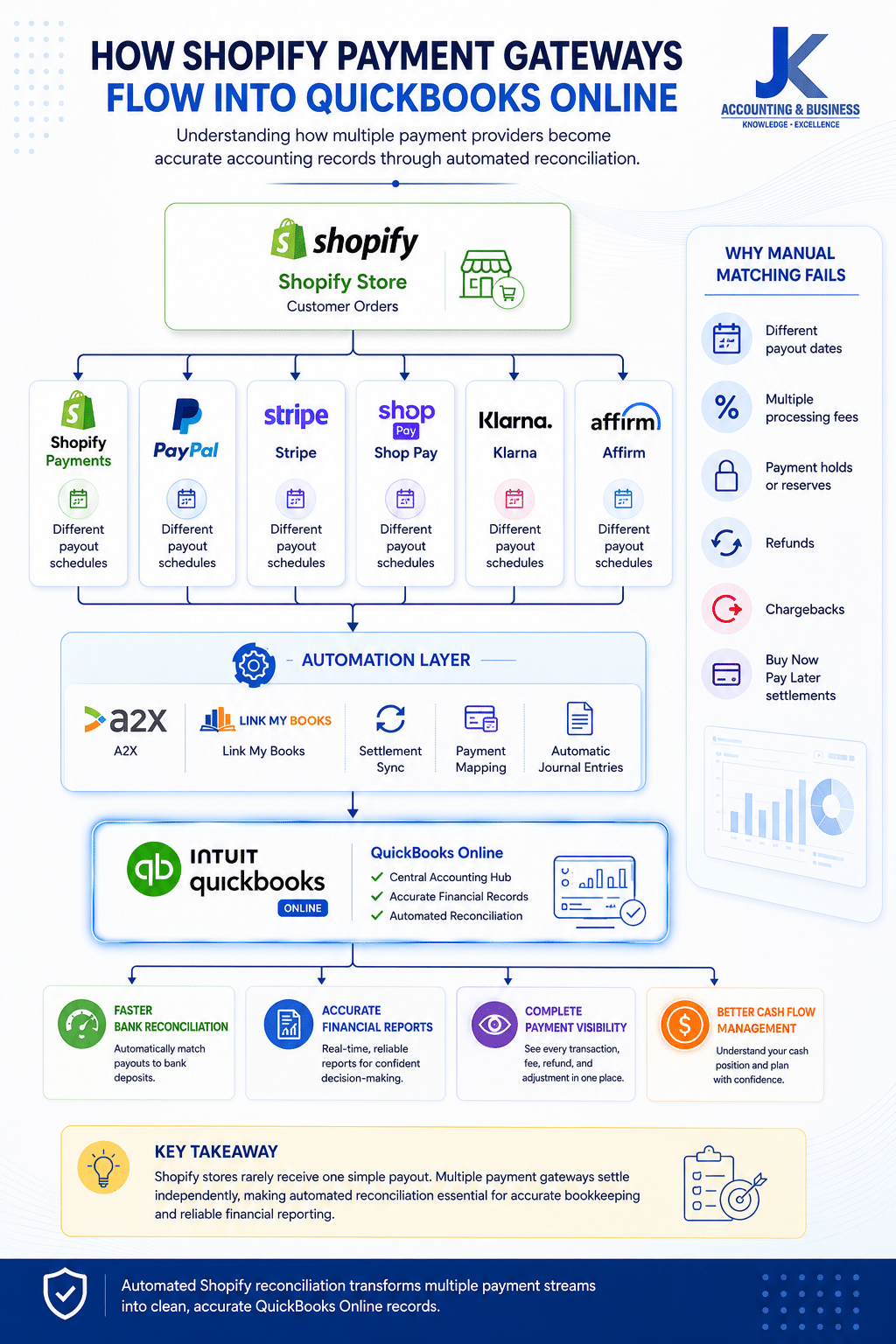
Unlike Amazon, Shopify does not operate as a single marketplace with one centralized settlement process. Instead, your store may receive payments through multiple payment gateways, each following its own payout schedule and fee structure.Depending on your checkout configuration, your business may process payments through:
- Shopify Payments
- PayPal Express Checkout
- Stripe or Shop Pay
- Buy Now, Pay Later providers such as Klarna or Affirm
Each payment provider deducts different transaction fees, holds reserves when necessary, and transfers funds according to its own settlement schedule. Matching every payout manually against bank deposits and customer orders becomes increasingly difficult as your daily sales volume grows.This is why many successful ecommerce businesses automate their payout reconciliation instead of manually matching every transaction.For a deeper understanding of ecommerce reconciliation best practices, explore our
Ultimate Guide to Ecommerce Reconciliation & Bookkeeping.

Shopify stores often receive payouts from multiple payment providers. Automating these payment flows into QuickBooks Online simplifies reconciliation and provides accurate financial reporting across every sales channel.
The Hidden Cost of Manual Bookkeeping
The biggest danger of manual bookkeeping isn’t simply the amount of time it consumes—it’s the accumulation of small errors that quietly impact your financial reports over time.Duplicate transactions, incorrectly categorized marketplace fees, unrecorded refunds, missed sales tax liabilities, and inaccurate inventory adjustments can gradually distort your cash flow, gross margins, and profitability reports. These errors often remain unnoticed until tax season, financial audits, or major business decisions reveal inconsistencies.By implementing an automated bookkeeping workflow with QuickBooks Online, Amazon FBA, Shopify, and specialized integration tools, businesses can significantly reduce manual errors while gaining accurate, real-time financial visibility that supports confident growth.
Why QuickBooks Online Remains the Industry Standard for Ecommerce Accounting
(The financial hub that brings every sales channel together.)
As ecommerce businesses grow, managing financial data across multiple platforms becomes increasingly challenging. Sales from Amazon FBA, Shopify, PayPal, Stripe, and other payment gateways generate thousands of transactions every month, making it difficult to maintain accurate financial records using spreadsheets or disconnected accounting systems.That’s why
QuickBooks Online (QBO) has become the preferred accounting platform for modern ecommerce businesses. Rather than acting as a simple bookkeeping application, QuickBooks Online serves as a centralized financial hub where sales, expenses, inventory costs, marketplace fees, bank transactions, and financial reports come together in one secure cloud-based environment.When integrated with ecommerce automation platforms, QuickBooks Online transforms complex marketplace settlements into organized journal entries, giving business owners accurate financial statements without manually recording every order. This not only improves bookkeeping efficiency but also provides reliable insights into profitability, cash flow, and business performance.Whether you’re working with an accountant, bookkeeper, or internal finance team, QuickBooks Online makes collaboration easier through cloud access, automated bank feeds, customizable reporting, and real-time financial visibility.Learn more about how QuickBooks supports growing online businesses in our guide to
QuickBooks Online: The Central Hub for Ecommerce Accounting.
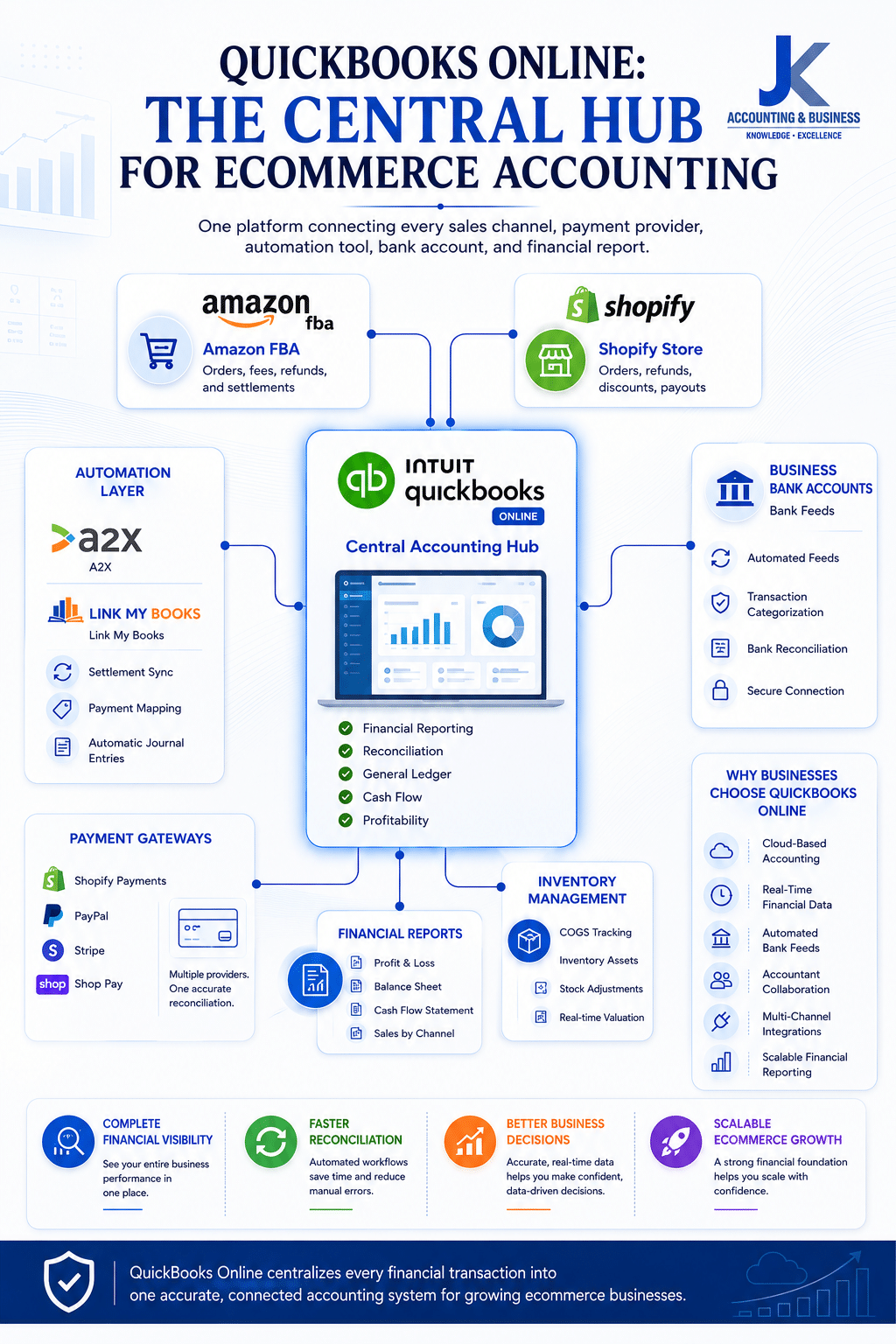
QuickBooks Online serves as the central accounting hub for ecommerce businesses, connecting Amazon FBA, Shopify, payment gateways, automation platforms, banking, and financial reporting into one accurate bookkeeping system.
Why Ecommerce Businesses Choose QuickBooks Online
- Centralizes financial data from multiple ecommerce platforms.
- Automatically connects with banks, payment gateways, and accounting apps.
- Supports real-time collaboration with accountants and finance teams.
- Generates customizable financial reports for better business decisions.
- Scales easily as transaction volumes continue to grow.
Choosing the Right Automation Layer for QuickBooks Online
QuickBooks Online provides the accounting foundation, but the quality of your bookkeeping also depends on how your ecommerce platforms connect to it. Not every integration solution handles marketplace transactions the same way, and choosing the wrong approach can create unnecessary reconciliation issues as your business grows.Most ecommerce businesses use one of the following integration methods.
| Integration Method | Advantages | Limitations |
|---|
| Manual CSV Imports | No additional software subscription required. | Time-consuming, highly manual, and prone to data entry errors. |
| Native Platform Connectors | Simple initial setup with direct platform connections. | Often imports every individual order, creating a cluttered general ledger and difficult bank reconciliations. |
| Settlement-Based Automation (A2X / Link My Books) | Automatically summarizes marketplace settlements into accurate journal entries that match bank deposits. | Requires a monthly software subscription but significantly reduces bookkeeping effort. |
For most growing Amazon and Shopify sellers, settlement-based automation provides the cleanest accounting workflow. Instead of importing thousands of individual customer orders, these platforms summarize each marketplace payout into organized journal entries that accurately reflect sales, fees, taxes, refunds, and other adjustments.This approach keeps your QuickBooks Online ledger clean while making reconciliation faster and improving profitability reporting across every sales channel.
A2X vs. Link My Books: Which Integration Is Better?
A2X and Link My Books are two of the most popular ecommerce accounting integrations available today. Both platforms automate settlement posting into QuickBooks Online, reducing manual bookkeeping while improving financial accuracy. The right choice depends largely on your business size, marketplace coverage, and reporting requirements.
| Feature | A2X | Link My Books |
|---|
| Amazon & Shopify Integration | ✔ Fully Supported | ✔ Fully Supported |
| Automated Journal Entries | ✔ Settlement-Based | ✔ Settlement-Based |
| Multi-Currency Support | Excellent | Strong |
| Sales Tax / VAT Mapping | Advanced Global Configuration | Excellent for UK & EU Sellers |
| Accountant Adoption | Industry Standard | Highly Rated |
| Additional Marketplace Support | Amazon, Shopify, Walmart, eBay and more | Expanding Marketplace Support |
| Starting Price | Approximately $29/month | Approximately £19/month |
Which One Should You Choose?
Choose A2X if: You operate a high-volume ecommerce business, sell across multiple international marketplaces, manage multiple currencies, or require advanced accounting workflows for your finance team or external accountant.
Choose Link My Books if: Your business is primarily focused on Amazon and Shopify, you prefer a simple guided setup, or you need strong VAT support for UK and European ecommerce operations.Regardless of which platform you choose, both solutions dramatically reduce manual bookkeeping, simplify bank reconciliation, and provide cleaner financial data than manual imports or standard native integrations.
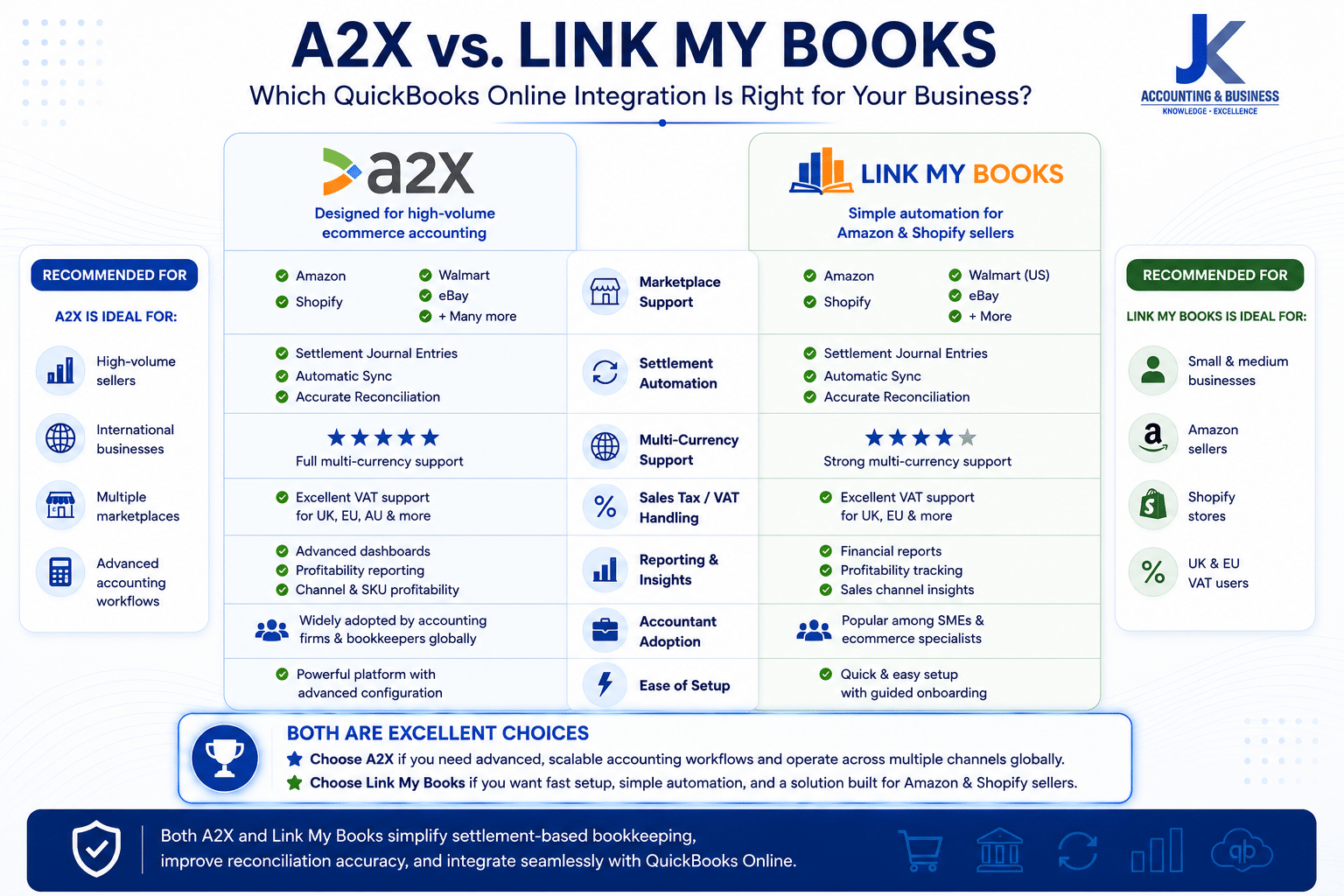
A2X and Link My Books both automate ecommerce bookkeeping for QuickBooks Online. Choosing the right platform depends on your sales channels, international operations, tax requirements, and reporting needs.
(Build an automated bookkeeping workflow that scales with your ecommerce business.)
Once you’ve selected QuickBooks Online and an automation platform such as A2X or Link My Books, the next step is configuring your integrations correctly. A well-planned setup ensures every marketplace settlement is accurately categorized, reconciled, and reflected in your financial reports without requiring manual intervention.While every business has unique accounting requirements, the following workflow represents the best practice used by many successful Amazon FBA and Shopify sellers.
Amazon Seller Central Setup Workflow
Connecting Amazon Seller Central to QuickBooks Online involves more than simply authorizing an integration. Building the correct accounting structure from the beginning helps prevent reconciliation issues and keeps your financial reports accurate as your business grows.
Recommended Amazon FBA Setup Process
| Step | What to Do | Why It Matters |
|---|
| 1. Prepare QuickBooks Online | Review your QuickBooks settings, connect business bank accounts, and enable multi-currency if you sell internationally. | Creates a clean accounting foundation before importing marketplace data. |
| 2. Build Your Chart of Accounts | Create dedicated accounts for Amazon sales, referral fees, FBA fees, storage fees, shipping expenses, advertising costs, refunds, and sales tax. | Improves reporting accuracy and simplifies reconciliation. |
| 3. Connect Amazon via A2X or Link My Books | Authorize your Amazon Seller Central account and select the marketplaces you want to synchronize. | Allows settlement data to flow securely into QuickBooks Online. |
| 4. Configure Account Mapping | Assign every transaction type to the correct ledger account inside QuickBooks. | Ensures sales, fees, taxes, and expenses are categorized correctly. |
| 5. Test a Settlement Import | Import one historical settlement and compare it with the corresponding bank deposit. | Confirms your mappings are accurate before enabling automation. |
| 6. Enable Automatic Posting | Activate scheduled synchronization after verifying your test import. | Automates ongoing bookkeeping while maintaining accurate records. |
Once configured correctly, every Amazon settlement is automatically summarized into balanced journal entries that match your bank deposits, dramatically reducing manual bookkeeping work while improving reporting accuracy.
Shopify Integration Setup Workflow
Shopify bookkeeping requires a slightly different approach because your store may receive payments from multiple payment providers rather than a single marketplace settlement. Mapping these payment flows correctly is essential for accurate reconciliation.
Recommended Shopify Setup Process
| Step | What to Do | Purpose |
|---|
| 1. Review Payment Gateways | Identify every active payment method including Shopify Payments, PayPal, Stripe, Shop Pay, Klarna, and Affirm. | Provides complete visibility into where customer payments originate. |
| 2. Connect Shopify | Authorize Shopify within your automation platform using a secure API connection. | Enables automatic settlement-based synchronization. |
| 3. Configure Revenue Accounts | Create dedicated ledger accounts for product sales, shipping income, discounts, gift cards, payment processing fees, and taxes. | Improves financial reporting and profitability analysis. |
| 4. Enable Daily Synchronization | Schedule automatic daily settlement imports into QuickBooks Online. | Keeps financial records updated with minimal manual effort. |
| 5. Validate Your Reconciliation | Compare Shopify payout reports against your QuickBooks clearing account and bank deposits. | Confirms that every payout has been recorded accurately. |
Performing a reconciliation check after your initial setup helps identify mapping errors before they affect your financial statements. Once your workflow is verified, the integration will continue processing future settlements automatically, providing reliable and audit-ready bookkeeping records.
Best Practice
- Always build your Chart of Accounts before connecting any marketplace.
- Test historical settlements before enabling live synchronization.
- Use dedicated clearing accounts for Amazon and Shopify payouts.
- Review reconciliation reports monthly to ensure every payout matches your bank deposits.
- Work with an ecommerce accountant when configuring complex tax or multi-currency environments.
Building an Ecommerce-Focused Chart of Accounts
A well-structured ecommerce Chart of Accounts organizes revenue, marketplace fees, inventory, refunds, advertising, and operating expenses into dedicated categories, giving Amazon FBA and Shopify businesses more accurate financial reporting and profitability insights.
(A well-structured Chart of Accounts is the foundation of accurate ecommerce bookkeeping.)
Even with QuickBooks Online and automated integrations in place, your financial reports are only as accurate as your Chart of Accounts (COA). Many ecommerce businesses experience reporting issues because they rely on generic accounting templates that weren’t designed for marketplace selling.A standard Chart of Accounts often combines all revenue into a single sales account and groups marketplace fees under broad expense categories. While this may seem convenient, it makes it difficult to understand where your profits are coming from, which products are performing best, or how much you’re actually spending on marketplace fees and advertising.A dedicated ecommerce Chart of Accounts organizes every transaction into meaningful categories, giving you complete visibility into revenue, operating costs, inventory movements, and profitability across every sales channel.
Essential Accounts Every Ecommerce Business Should Track
| Account Category | Recommended Setup | Business Benefit |
|---|
| Revenue by Sales Channel | Create separate accounts for Amazon Product Revenue, Shopify Sales, Wholesale Revenue, and Other Marketplace Sales. | Measure the profitability of each sales channel independently. |
| Marketplace Fees | Separate Amazon Referral Fees, FBA Fulfillment Fees, Shopify Processing Fees, and Subscription Fees. | Monitor rising platform costs and improve pricing decisions. |
| Refunds & Returns | Record refunds as a dedicated Contra-Revenue account instead of reducing total sales. | Track return rates and identify products with profitability issues. |
| Advertising Expenses | Create separate expense accounts for Amazon PPC, Google Ads, Meta Ads, TikTok Ads, and other marketing platforms. | Measure Return on Ad Spend (ROAS) and marketing performance accurately. |
| Inventory Management | Maintain Inventory Asset, Cost of Goods Sold (COGS), Inventory Adjustments, and Shrinkage accounts. | Provides accurate inventory valuation and gross profit reporting. |
Separating your accounts in this way allows QuickBooks Online to generate far more meaningful financial reports. Instead of seeing a single sales figure, you’ll understand exactly how much revenue each marketplace generates, how much each platform costs, and where opportunities exist to improve profitability.For example, if Amazon referral fees increase during a promotional campaign or Meta advertising costs begin reducing your profit margins, a properly structured Chart of Accounts makes those trends immediately visible. This level of financial insight supports better pricing decisions, inventory planning, marketing optimization, and long-term business growth.As your ecommerce business expands into additional marketplaces or international regions, a scalable Chart of Accounts also makes it easier to add new revenue streams without disrupting your existing bookkeeping structure. Combined with QuickBooks Online and settlement-based automation, it creates a reliable accounting system that grows alongside your business.
Best Practices for an Ecommerce Chart of Accounts
- Create separate revenue accounts for every major sales channel.
- Track marketplace fees individually instead of grouping them into general expenses.
- Record refunds and returns as Contra-Revenue rather than reducing gross sales.
- Separate advertising expenses by platform to measure ROAS accurately.
- Maintain dedicated inventory asset and COGS accounts for reliable profitability reporting.
The Automated Month-End Reconciliation Workflow
(Automation handles the repetitive work, but monthly financial reviews keep your books accurate.)
Automating your bookkeeping dramatically reduces manual data entry, but it doesn’t eliminate the need for regular financial oversight. Even the most advanced ecommerce accounting integrations rely on accurate account mappings, inventory updates, and reconciliation reviews to maintain reliable financial records.At the end of each month, every Amazon FBA and Shopify business should complete a structured reconciliation process to verify that marketplace settlements, bank deposits, inventory balances, and operating expenses are accurately reflected in QuickBooks Online. Performing these checks consistently helps identify discrepancies early, maintain audit-ready records, and ensure your financial reports support confident business decisions.
Monthly Ecommerce Reconciliation Checklist
| Step | Action | Why It Matters |
|---|
| 1. Reconcile Marketplace Clearing Accounts | Confirm that Amazon and Shopify clearing accounts reconcile to zero after settlement journal entries match your actual bank deposits. | Ensures every marketplace payout has been recorded correctly without duplicate or missing transactions. |
| 2. Verify Inventory Asset Balances | Review inventory values and compare physical inventory with the Inventory Asset account in QuickBooks Online. | Maintains accurate Cost of Goods Sold (COGS) calculations and reliable profitability reporting. |
| 3. Review Shipping & Fulfillment Costs | Verify packaging expenses, warehouse storage fees, fulfillment charges, and carrier invoices. | Helps identify rising operational costs that may impact product margins. |
| 4. Review Marketplace Fees | Analyze referral fees, payment processing fees, subscription charges, and advertising costs. | Provides greater visibility into platform expenses and overall profitability. |
| 5. Generate Financial Reports | Review your Profit & Loss Statement, Balance Sheet, and Cash Flow Report before closing the month. | Ensures management decisions are based on accurate and up-to-date financial information. |
Inventory Valuation Formula
Ending Inventory = Beginning Inventory + New Inventory Purchases − Cost of Goods Sold (COGS)
Regularly reviewing this inventory calculation helps ensure that your Inventory Asset account accurately reflects the physical stock available for sale. Any discrepancies should be investigated promptly to identify inventory shrinkage, damaged products, supplier issues, or bookkeeping errors before they affect your financial statements.Although automation handles the majority of transaction processing, monthly reconciliation remains one of the most important financial controls for growing ecommerce businesses. A consistent review process provides confidence that your books are complete, your reports are reliable, and your business decisions are based on accurate financial data.
Month-End Best Practices
- Reconcile Amazon and Shopify clearing accounts every month.
- Review inventory balances before closing each accounting period.
- Monitor fulfillment, shipping, and marketplace fees separately.
- Investigate reconciliation differences immediately rather than allowing them to accumulate.
- Generate monthly financial reports to evaluate profitability and cash flow trends.
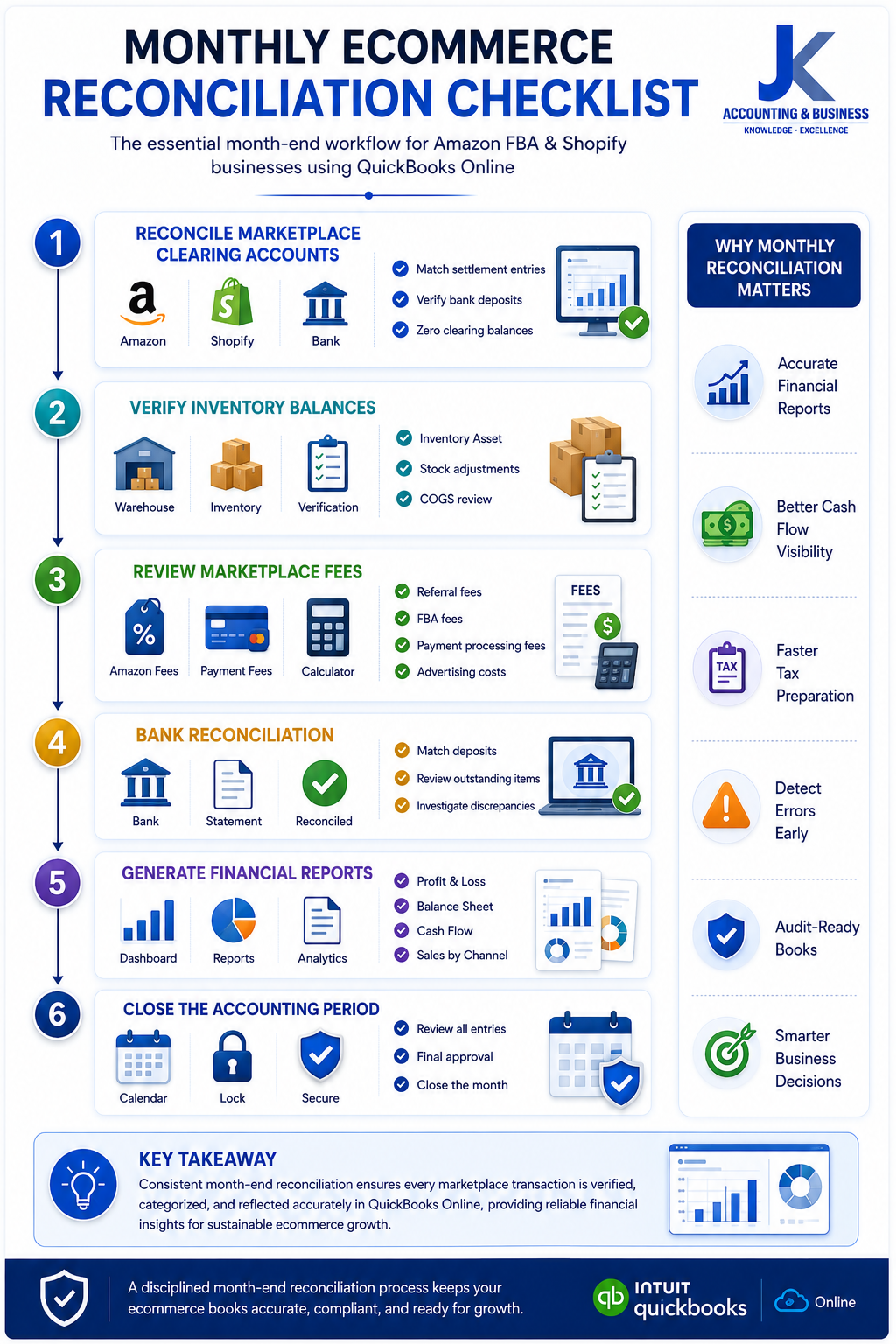
A structured month-end reconciliation checklist helps ecommerce businesses verify marketplace payouts, inventory balances, bank transactions, and financial reports, ensuring accurate bookkeeping and reliable financial visibility in QuickBooks Online.
Cost-Benefit Analysis: The ROI of Ecommerce Bookkeeping Automation
(A small monthly software investment can save dozens of hours and improve financial accuracy.)
When evaluating bookkeeping automation, many ecommerce business owners focus primarily on the monthly subscription cost of platforms like QuickBooks Online, A2X, or Link My Books. While keeping operating expenses under control is important, looking only at software costs often overlooks the much greater value that automation delivers.Manual bookkeeping consumes valuable time every month. Reconciling marketplace settlements, matching bank deposits, correcting data entry mistakes, and preparing month-end reports can easily require dozens of hours. As transaction volumes increase, these administrative tasks continue to grow, reducing the time available for activities that directly generate revenue.Automation shifts your team’s focus away from repetitive bookkeeping and toward strategic business activities such as inventory planning, marketing optimization, customer acquisition, and financial analysis. The result is not only lower administrative costs but also more accurate financial reporting and faster decision-making.
Example: Ecommerce Business Generating $750,000 in Annual Revenue
| Monthly Accounting Activity | Manual Bookkeeping | Automated Workflow | Time Saved |
|---|
| Settlement Reconciliation & Account Mapping | 8 Hours | 2 Hours | 6 Hours |
| Shopify Payment Gateway Reviews | 5 Hours | Less than 1 Hour | 5 Hours |
| Month-End Journal Entries | 6 Hours | 2 Hours | 4 Hours |
| Error Correction & Data Cleanup | 4 Hours | 1 Hour | 3 Hours |
| Total Monthly Time | 23 Hours | 5 Hours | 18 Hours Saved |
Estimated Monthly ROI
| Calculation | Value |
|---|
| Hours Saved Per Month | 18 Hours |
| Average Administrative Cost | $40 per Hour |
| Estimated Monthly Savings | $720 |
| Estimated Annual Savings | $8,640+ |
In this example, automating bookkeeping saves approximately 18 hours every month. At an estimated labor cost of $40 per hour, that’s roughly $720 in monthly operational savings, or more than $8,640 annually. For most growing ecommerce businesses, these savings significantly exceed the combined subscription costs of QuickBooks Online and an automation platform.Beyond the measurable time savings, automation also reduces manual errors, improves financial reporting accuracy, speeds up month-end closing, and gives business owners real-time visibility into profitability and cash flow. These operational improvements often deliver even greater long-term value than the direct labor savings alone.
Why Automation Delivers Strong ROI
- Reduces repetitive bookkeeping tasks by more than 75%.
- Minimizes manual data entry and reconciliation errors.
- Provides accurate financial reports for faster business decisions.
- Allows business owners and finance teams to focus on growth instead of administrative work.
- The long-term savings typically outweigh the monthly software subscription costs.
5 Common Ecommerce Bookkeeping Automation Mistakes to Avoid
(Automation simplifies bookkeeping—but only when it’s configured and monitored correctly.)
Bookkeeping automation can save hours of manual work every month, but implementing the wrong accounting practices can still lead to inaccurate financial reports, reconciliation issues, and costly tax mistakes. Many ecommerce businesses assume that once an integration is connected, everything will run perfectly without further attention.In reality, automation is only as effective as the accounting structure behind it. Understanding the most common mistakes can help you maintain clean financial records and get the maximum value from your QuickBooks Online automation workflow.
Common Mistakes That Can Affect Your Ecommerce Financial Reports
| Mistake | Why It’s a Problem | Best Practice |
|---|
| 1. Recording Net Deposits as Revenue | Marketplace fees, fulfillment charges, taxes, and refunds remain hidden, resulting in inaccurate Profit & Loss reports. | Always record gross sales separately from fees and deductions using settlement-based journal entries. |
| 2. Ignoring Refund & Return Transactions | Untracked refunds and non-refundable processing fees inflate profit margins and distort financial performance. | Create dedicated Contra-Revenue accounts to track refunds, returns, and related fees. |
| 3. Using Generic QuickBooks Account Layouts | Marketplace fees and ecommerce expenses become grouped under broad categories like “Office Expenses,” making profitability analysis difficult. | Build a dedicated ecommerce Chart of Accounts tailored to Amazon, Shopify, advertising, inventory, and marketplace fees. |
| 4. Skipping Monthly Inventory Adjustments | Automation records financial transactions but does not automatically adjust physical inventory values or shrinkage. | Review inventory balances and update Inventory Asset and COGS accounts every month. |
| 5. Relying Entirely on Automation | Incorrect account mappings or unexpected marketplace changes may go unnoticed without periodic reviews. | Perform monthly reconciliation reviews and verify automated journal entries before closing each accounting period. |
One of the most common mistakes is recording the final marketplace deposit as total revenue. Because Amazon and Shopify deduct fees before transferring funds, this approach hides significant operating expenses and can create misleading financial statements.Another issue is relying on the default Chart of Accounts included with QuickBooks Online. While suitable for many traditional businesses, generic account structures rarely provide the level of detail required to analyze marketplace fees, advertising performance, inventory costs, and channel profitability.Finally, remember that automation supports your bookkeeping process—it doesn’t replace financial oversight. Reviewing reconciliations, inventory balances, and financial reports each month helps ensure your accounting records remain accurate as your ecommerce business continues to grow.For more guidance on avoiding common bookkeeping errors, explore our article on
Ecommerce Bookkeeping Mistakes Costing US Sellers Thousands.
Best Practices for Successful Automation
- Record gross sales, marketplace fees, and net deposits separately.
- Track refunds, returns, and processing fees using dedicated accounts.
- Use an ecommerce-specific Chart of Accounts instead of default templates.
- Review inventory values and Cost of Goods Sold every month.
- Combine automation with regular human review to maintain accurate financial records.
Final Thoughts: Build a Bookkeeping System That Grows With Your Business
The difference between an ecommerce business that scales successfully and one that struggles to maintain profitability often comes down to one factor—financial visibility. As sales increase across Amazon FBA, Shopify, and other online marketplaces, relying on spreadsheets and manual bookkeeping quickly becomes inefficient, error-prone, and difficult to manage.By combining QuickBooks Online with settlement-based automation tools like A2X or Link My Books, you can transform complex marketplace transactions into accurate, organized financial records. Instead of spending hours reconciling payouts and correcting bookkeeping errors, you’ll gain reliable reports, faster month-end closes, improved cash flow visibility, and the confidence to make informed business decisions.Automation isn’t simply about reducing manual work—it’s about creating a scalable accounting system that supports long-term growth. With the right Chart of Accounts, properly configured integrations, and consistent monthly reconciliation, your bookkeeping becomes a strategic asset that helps you monitor profitability, optimize inventory, control operating costs, and plan for the future.Whether you’re an established Amazon seller, a growing Shopify brand, or managing multiple ecommerce channels, investing in an automated bookkeeping workflow today can save countless hours while providing the financial clarity needed to scale your business with confidence.
Key Takeaways
- QuickBooks Online provides a centralized accounting platform for multi-channel ecommerce businesses.
- Automation tools like A2X and Link My Books simplify reconciliation and improve bookkeeping accuracy.
- A dedicated ecommerce Chart of Accounts delivers better financial reporting and profitability analysis.
- Regular month-end reviews remain essential, even with automated bookkeeping.
- A scalable bookkeeping system supports smarter decisions, healthier cash flow, and sustainable business growth.
Need Help Automating Your Ecommerce Bookkeeping?
Managing Amazon FBA and Shopify accounting doesn’t have to be complicated. At
JK Cloud Ledger, we help ecommerce businesses implement scalable bookkeeping systems, automate QuickBooks Online workflows, reconcile marketplace payouts, and generate accurate financial reports that support long-term growth.
Schedule a Free Consultation and discover how our ecommerce accounting experts can help you simplify bookkeeping, improve financial visibility, and spend more time growing your business.
Frequently Asked Questions (FAQs)
Can Amazon FBA and Shopify be connected directly to QuickBooks Online?
Yes. Amazon FBA and Shopify can both be integrated with QuickBooks Online using specialized automation platforms such as A2X and Link My Books. These tools automatically import marketplace settlement data, categorize transactions correctly, and simplify bank reconciliation without requiring manual data entry.Why doesn’t my Amazon payout match my sales revenue?
Amazon deposits represent your net settlement rather than total sales revenue. Before transferring funds, Amazon deducts referral fees, FBA fulfillment charges, storage fees, advertising costs, refunds, and other marketplace expenses. Proper bookkeeping separates each of these components to produce accurate financial reports.Is QuickBooks Online the best accounting software for ecommerce businesses?
QuickBooks Online is one of the most widely used accounting platforms for ecommerce businesses because it supports cloud-based bookkeeping, automated bank feeds, customizable financial reports, and integrations with major ecommerce platforms including Amazon, Shopify, Stripe, PayPal, and many third-party automation tools.Which is better: A2X or Link My Books?
Both A2X and Link My Books provide reliable settlement-based accounting for Amazon and Shopify sellers. A2X is generally preferred by larger businesses with international operations and advanced accounting requirements, while Link My Books offers a streamlined setup process that works well for many growing ecommerce businesses.Do I still need monthly reconciliation if my bookkeeping is automated?
Yes. Automation significantly reduces manual bookkeeping, but monthly reconciliation remains essential. Reviewing bank deposits, marketplace settlements, inventory balances, and financial reports helps identify discrepancies and ensures your books remain accurate and audit-ready.How should marketplace fees be recorded in QuickBooks Online?
Marketplace fees should be recorded in dedicated expense accounts rather than deducted directly from sales revenue. Separating Amazon referral fees, FBA fulfillment fees, Shopify payment processing fees, and advertising costs provides more accurate profitability reporting and better financial analysis.Should Shopify sales and Amazon sales use separate revenue accounts?
Yes. Creating separate revenue accounts for each sales channel makes it easier to measure channel performance, analyze profitability, reconcile marketplace payouts, and prepare more meaningful financial reports.What is the biggest bookkeeping mistake ecommerce sellers make?
One of the most common mistakes is recording the net marketplace deposit as total sales revenue. This hides marketplace fees and operating expenses, resulting in inaccurate Profit & Loss statements, misleading profitability reports, and potential tax reporting issues.Can bookkeeping automation save money for growing ecommerce businesses?
Yes. By reducing manual data entry, simplifying reconciliation, and minimizing bookkeeping errors, automation can save dozens of administrative hours each month. Many growing ecommerce businesses recover significantly more value in labor savings than they spend on bookkeeping automation software.How can JK Cloud Ledger help automate ecommerce bookkeeping?
JK Cloud Ledger helps Amazon FBA and Shopify businesses implement QuickBooks Online, automate settlement reconciliation, build ecommerce-specific Charts of Accounts, prepare accurate financial reports, and create scalable bookkeeping systems that support long-term business growth.